SideVision sonar display settings
The SideVision™channel includes the following Sonar display options:
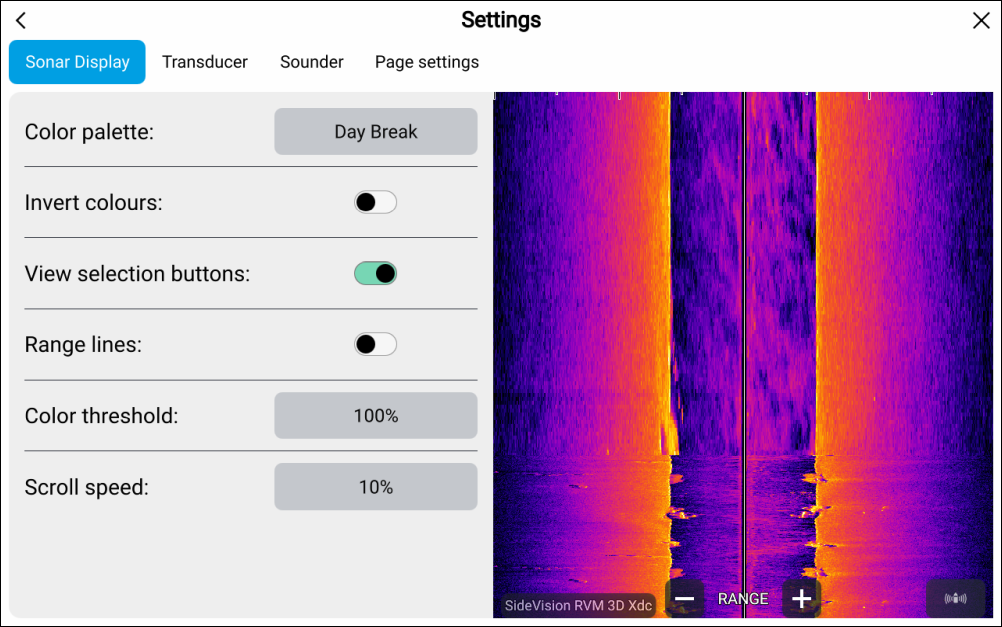
Fishfinder Color paletteColor palette: — select to change the color palette used to identify the bottom, bottom structure and detected targets. The following color palettes are available:
Day Break (RVM only)
Coho Salmon (RVM only)
Mahi (RVM only)
Snapper (RVM only)
Yellowfin (RVM only)
Copper
Slate Gray
Lime Green
Burnt Yellow
Cool Blue
Ruby Red
Fishfinder Invert colorsInvert colors: — in the Fishfinder app color scales or shading is used to differentiate distances, depths and/or intensity of detected objects. you can invert the colors by selecting this option.
Fishfinder View selection buttonsView selection buttons: — select to enable and disable onscreen buttons for side selection.
Fishfinder Range linesRange lines: — select to enable and disable onscreen vertical lines to represent range from your vessel.
Fishfinder Color thresholdColor threshold: — select to adjust the color threshold. Color threshold determines the signal strength below which target returns are not shown. A low value results in only the strongest colors or lightest shades being displayed.
Fishfinder Scroll speedScroll speed: — select to adjust the speed the scrolling image.