3D Vision sonar display settings
3D Vision channels include the following Sonar display options:
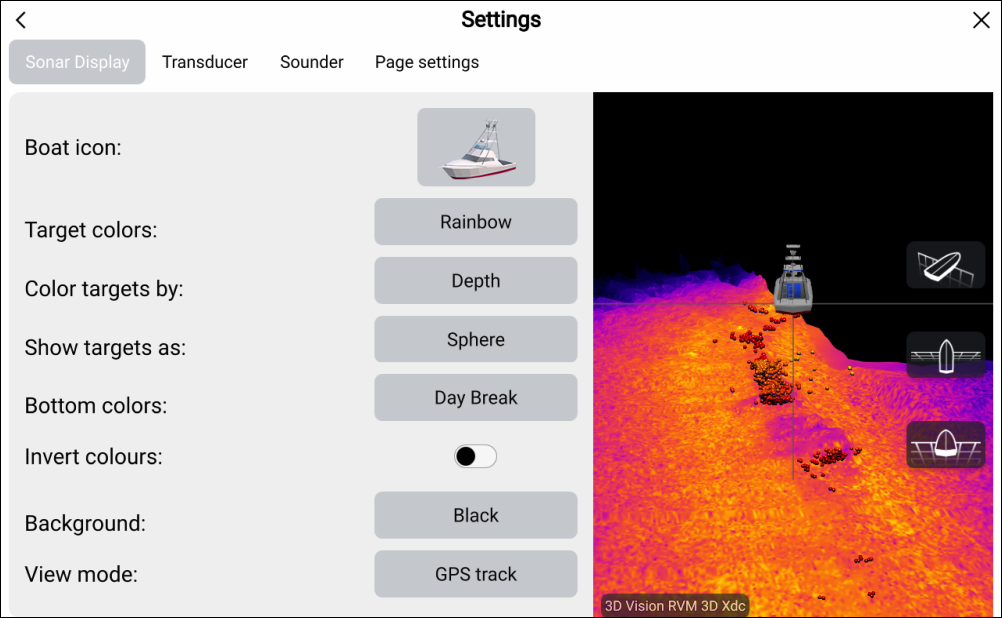
Fishfinder Boat iconBoat icon: — select the icon that is used to represent your vessel’s position. There are 4 vessel types to choose from.
Fishfinder target colorsTarget colors: — Select the color palette that you want detected targets to use. The following color palettes are available:
Rainbow
Burnt Yellow
Cool Blue
Lime Green
Ruby Red
Fishfinder Color targets byColor targets by: — select to change how targets are colored. You can choose between:
Depth, which colors targets according to their depth; a gradient scale can be shown on the 3D grid to aid depth identification, or
- Intensity, which colors targets according to their size; the bigger the target, the darker the color used.
Fishfinder Show targets asShow targets as: — select to change the shape of targets. You can choose between:
Point, which provides the highest resolution, or:
Sphere, which provides lower resolution but increases target size for better visibility.
Fishfinder Bottom colorsBottom colors: — select to change the color palette used for the bottom and bottom structure. The following colors are available:
Day Break (RVM transducers only)
Coho Salmon (RVM transducers only)
Mahi (RVM transducers only)
Snapper (RVM transducers only)
Yellowfin (RVM transducers only)
Copper
Slate Gray
Lime Green
Burnt Yellow
Cool Blue
Ruby Red
Fishfinder Invert colorsInvert colors: — in the Fishfinder app, color scales or shading is used to differentiate distances, depths and/or intensity of detected objects. You can invert the colors by selecting this option.
Fishfinder BackgroundBackground: — you can change the background color that is used to represent the water. The following colors are available:
Black
Blue
White
Gray
Fishfinder View modeView mode: — select how you want the fishfinder image to appear:
GPS track — the boat icon will remain in the same position and bottom structure and target detail will move in true relation to your vessel’s movements.
Scrolling image — the sonar pings at a constant speed and displays a scrolling image behind the boat icon.