Sidebar
The Sidebar is available in all app pages that are accessed from the Homescreen. The sidebar provides quick access to system data.
The sidebar is accessed using the touchscreen.Sidebar
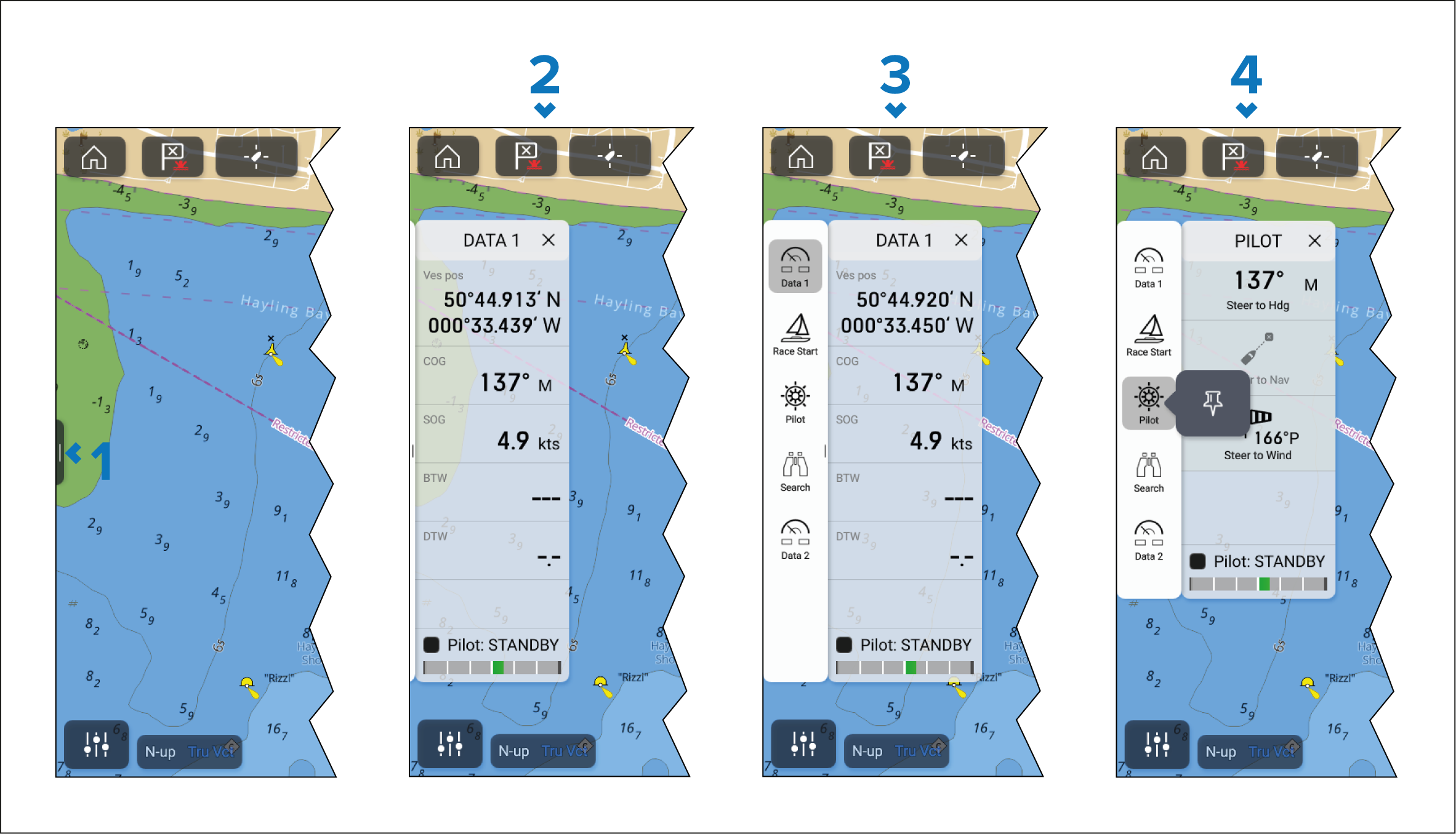
A short left-to-right swipe when touching the sidebar control (“handle”) on the left edge of the screen displays the sidebar. A long swipe displays the sidebar and sidebar menu.
With the sidebar open, a left-to-right swipe on the sidebar opens the sidebar menu. A right-to-left swipe closes the sidebar.
With the sidebar menu displayed, you can select a sidebar icon to display that sidebar. A right-to-left swipe closes the sidebar menu. The sidebar menu automatically closes after approximately 10 seconds of inactivity.
To permanently display the sidebar,, select and hold on a sidebar icon, and then select the pin icon. When pinned, the sidebar cannot be closed by swiping and must be unpinned before you can close the sidebar.
Selecting the ‘X’ located on the top right of the sidebar closes the sidebar and sidebar menu.
The Sidebar is opened automatically in the Chart app when a Goto or Follow action is initiated.