SRU search controls
When performing a search as an SRU, search controls are available to help you manage the search.
Divert controls
SARsearch controlsSRU search controls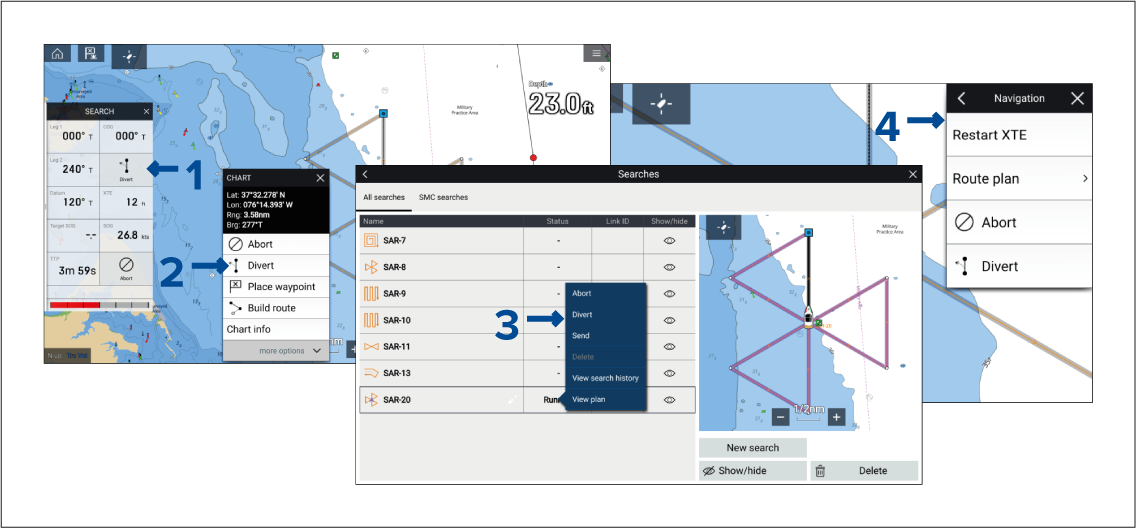
The controls can be accessed from the search sidebar (1), the chart app context menu (2), the searches list (3), and the Navigate menu (4).
The following options are available:
SAR DivertDivert — This option is available when you are following the search pattern. Selecting Divert allows you to record a diversion from the search.
SAR End divertEnd divert — This option is available when you have diverted from the search pattern (i.e.: once Divert has been selected). Selecting End divert allows you to navigate back to the point at which you diverted from the search.
SAR ResumeResume — This option is available when you are travelling back to a diversion point. Selecting Resume will navigate to the next waypoint in the search.
SAR AbortAbort — The abort option is available when you are following the search pattern. Selecting Abort will stop the route follow and abort the search.