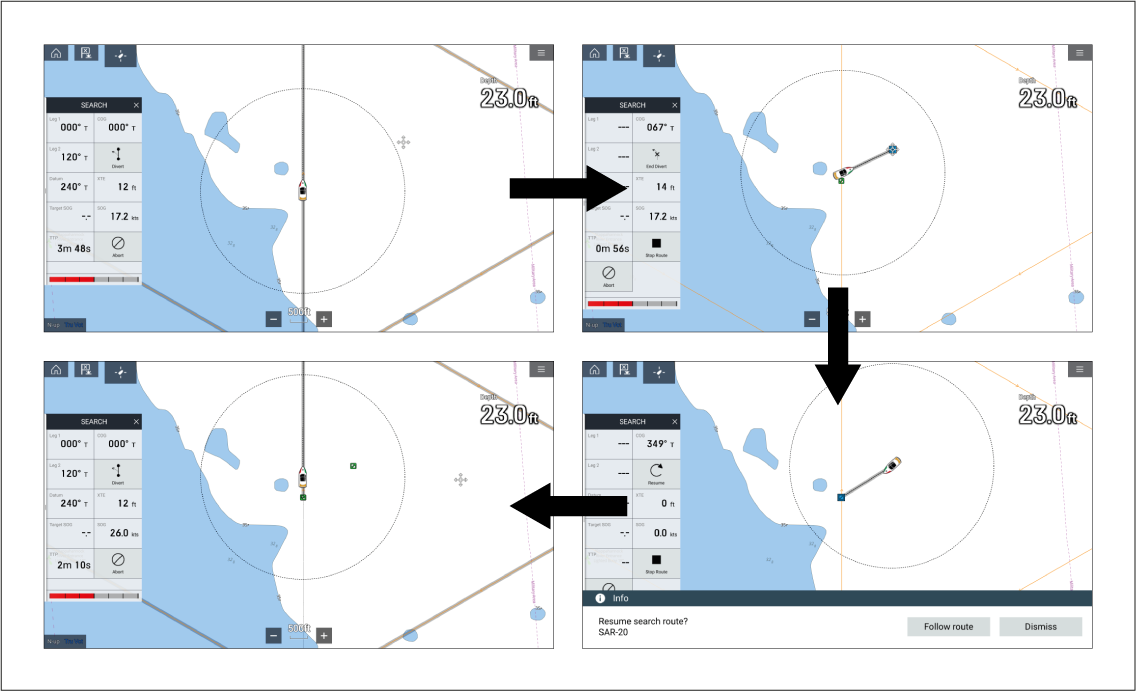
If you need to divert from a search to investigate a point
or area of interest not covered by the SAR pattern, the Divert and End divert options should be used. This will
ensure that the SMC is notified of the diversion.
SARDivertingFirst responder SAR divert
Select Divert.
Active navigation of the SAR pattern will stop and a divert
marker will be placed at your vessel’s location.
Note
At any time during a divert you can resume the
search from any waypoint in the SAR pattern that is ahead of the divert
marker, by selecting Resume from here from the
waypoint’s context menu. Active navigation of the SAR pattern will
resume from the chosen waypoint.
Perform manual navigation or perform other active navigation
such as a Goto to navigate to the point or area
of interest.
Once you have completed the divert, select End
Divert.
The resume search notification is displayed.
Select Follow route to start active
navigation back to the divert marker (the point you left the SAR pattern),
or select Dismiss to resume the search at a later
time.
Note
If you select Dismiss, the
SMC will see your status as ‘Resuming’ until you have resumed the
search. To resume the search, select Resume from
one of the following locations:
The search sidebar.
The chart app Navigation menu.
The SAR pattern context menu.
The related inbox message options.
The waypoint options from the SAR route plan list.
The resume search notification is displayed and you can select Follow route to resume active navigation of the SAR pattern
from the divert marker.
Once you reach the original divert marker, select OK on the waypoint arrival alarm.
Active navigation of the SAR pattern will be resumed and
the SMC will be updated that you have resumed the search.