SRU divert as instructed — overview
During a managed search, the SMC may instruct the SRU to divert from the search pattern to investigate a point or area of interest not covered by the SAR pattern.
SAR DivertSAR SMC instructed divertWhen an instruction to divert is received, a notification is displayed onscreen and a “Divert to” marker is shown in the Chart app.
The SMC may also include instructions of the position within the search pattern to divert from. In this situation, a corresponding “divert from here” marker will be shown in the Chart app. If no “Divert From here” marker was included, the divert should take place ASAP, but at the SRU’s discretion.
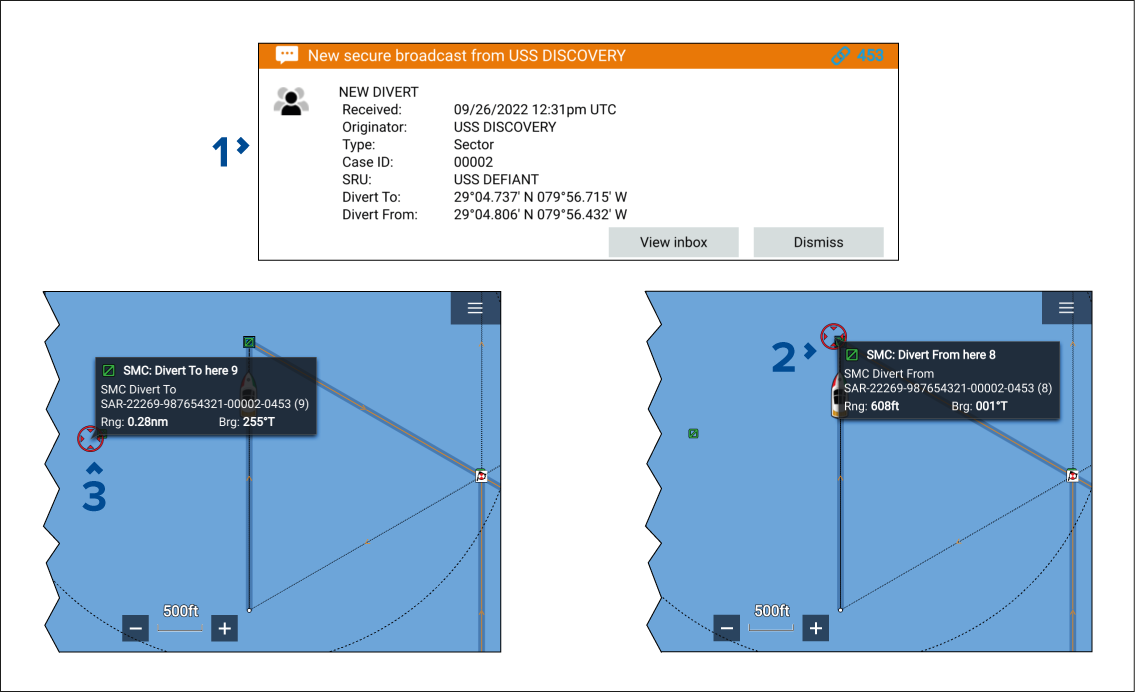
SMC divert notification — From the notification you can View inbox or Dismiss the notification.
“Divert From here” marker — If a “Divert From here” marker is included in the instruction, when the marker is reached the waypoint arrival alarm is displayed. Select Divert now and active navigation to the “Divert To here” marker will commence.
“Divert To here” marker — When the “Divert To here” marker is reached, select End divert from the context menu and then Follow route from the notification to resume the search from the “Divert From here” marker.