SAR (Search and Rescue) patterns
Attempting to search the water for an object can be challenging, due to the vastness of the ocean and the effects of tide. Additionally, the object you are searching for is not normally in its last known location.
Search and Rescue SAR
SAR Patterns are routes that can help you find an object in the water. Different types of SAR pattern are available and can take the effects of current/tide into account, enabling a more accurate and consistent route to search. SAR Patterns can be created on your MFD in the Chart app.
SAR patterns are broadcast at a 0.1 nm resolution. To ensure that SAR patterns appear the same on broadcaster and recipient MFDs, the Round patterns option should be enabled in the Responder Set up menu (). This will ensure that SAR patterns are rounded to the nearest 0.1 nm when they are created.
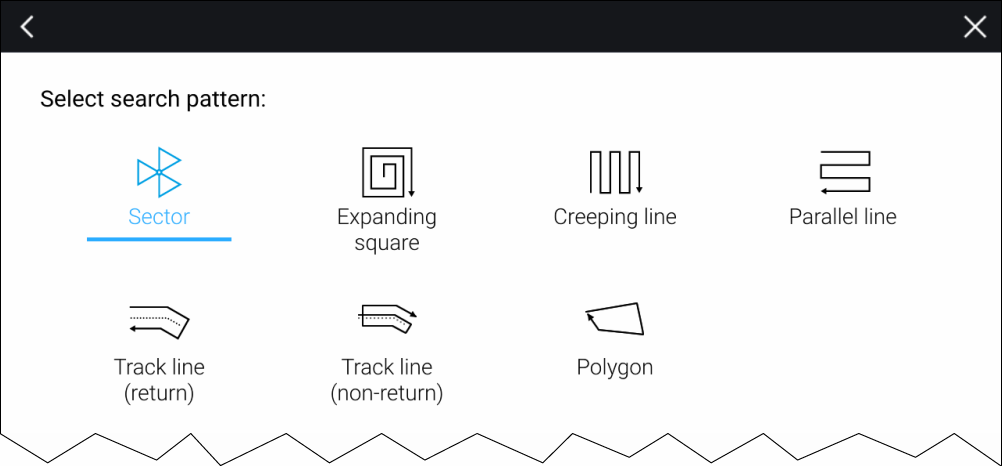
Search pattern options can be accessed from the Search patterns menu page: .
The available search pattern types are:
Sector Search: Sector search pattern
Expanding square: Expanding square search pattern
Creeping line: Creeping line / Parallel line search pattern
Parallel Line: Creeping line / Parallel line search pattern
Trackline (return): Trackline search (return) pattern
Trackline (non-return): Trackline search (non-return) pattern
Polygon: Polygon search pattern
Once a search pattern is created it can be managed from the searches lists. For further information refer to: Searches lists
When they are created, SAR pattern names are automatically pre-fixed with ‘SAR-’. If the ‘SAR-’ is removed or changed from the SAR pattern name it will no longer function as a SAR pattern (i.e.: it will not appear in the searches list or be able to be broadcast or followed as a SAR pattern). The renamed pattern will be treated as a normal route.
When the MFD is configured using the ‘First responder’ boating activity profile, SAR patterns can be broadcast and received over STEDS messaging. For more information refer to: SAR pattern broadcast and receipt
Before attempting to follow a search pattern ensure that you have set the waypoint arrival radius to the minimum value, otherwise the route navigated will not follow the search pattern.