Searches lists
SAR patterns are managed from the searches lists.
SAR Searches listThe searches list can be accessed from the Chart app menu: , or from the My Data menu: . When accessed from the chart app, the LiveView pane will be displayed and the Show on chart options are available.
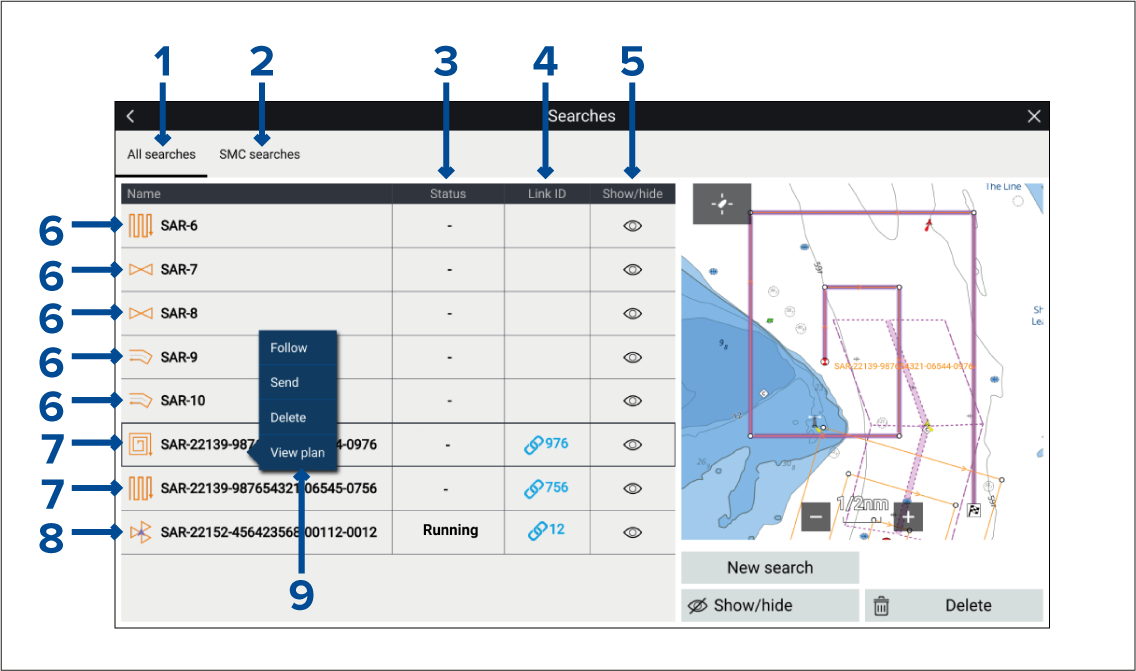
Figure 1. All searches list
The All searches tab contains a list of all broadcast and received SAR patterns.
The SMC searches tab contains only managed searches where your vessel is the SMC.
The status field identifies the status of received managed searches where your vessel is the SRU. SAR patterns that have been created on your system will not have a status.
The link ID field shows the relevant STEDs messaging link ID number.
You can hide/show SAR patterns in the chart app by selecting the icon.
Shows examples of SAR patterns either created on your system (which have not been broadcast), or patterns that have been received as an un-managed SAR pattern.
Shows examples of managed SAR patterns that have been broadcast by your vessel. To see search status, view the SMC searches list.
Shows example of a received SAR pattern where your vessel has been assigned as the SRU. The status field will identify your progress.
The SAR pattern pop-over menu provides SAR options and SRU SAR controls.