Rolling road page
The rolling road data page is always available. The rolling road page includes data relevant to navigation and includes a graphical rolling road.
Dashboard app Rolling road pageRolling road page
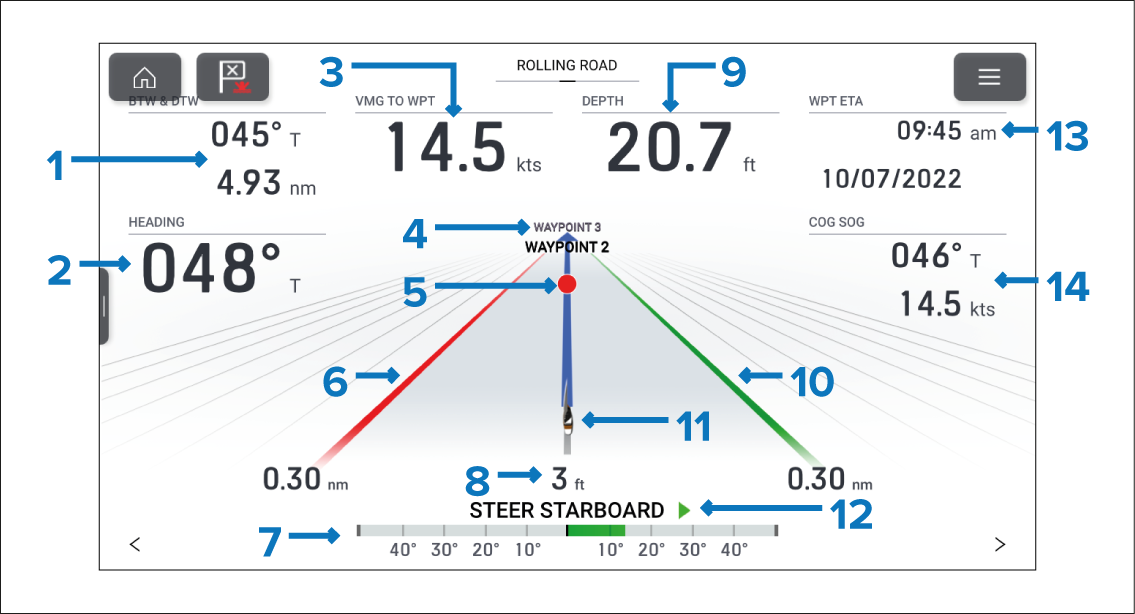
Figure 1. Default Navigation page
BTW & DTW — Bearing and distance to active waypoint or goto location.
HEADING — Current vessel heading.
VMG TO WPT — Velocity Made Good to the active waypoint or goto location.
Next waypoint — When following a route the next waypoint is displayed.
Active waypoint symbol — Active waypoint is the current destination (waypoint or goto location).
Left boundary line
Rudder bar — Provides an indication of rudder position.
Cross Track Error (XTE) — Distance from track line.
Depth — Current water depth.
Right boundary line
Vessel icon — Current vessel position.
Steering indicator — Provides steering instruction.
WPT ETA — Estimated time of arrival for the active waypoint location.
COG SOG — Course Over Ground & Speed Over Ground.
The rolling road graphic can be reproduced on custom pages using the . The rolling road graphic can be changed or hidden.
Data items 1 to 3, 9, 13 and 14 can be customized. Data item 7 and 12 can be hidden if desired.