Fuel page
The fuel data page is always available. The number of fuels tanks displayed on the fuel page is based on the number of fuel tanks selected during the initial MFD start up wizard. If more than 1 fuel tank is selected then the first 2 tanks will be displayed. The fuel page includes data relevant to fuel usage and includes a graphical fuel dial.
Dashboard app Fuel pageFuel dialFuel page Fuel dial
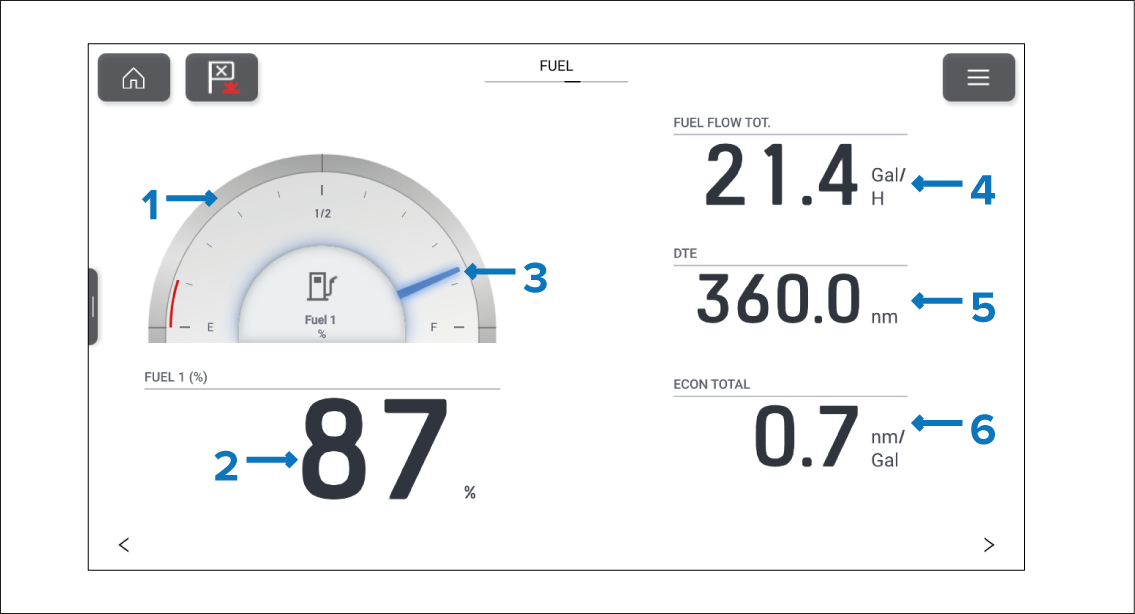
Figure 1. Example fuel page
Fuel graphic
Fuel (%) — Indication of percentage fuel remaining.
Fuel indicator — Indication of percentage fuel remaining.
FUEL FLOW TOT. — Total fuel flow.
DTE — Distance To Empty.
ECON TOTAL — Total fuel economy.
The fuel dial is unique to the fuel page and cannot be reproduced on other data pages. The fuel dial can be changed or hidden. All other data items on the fuel page can also be customized or hidden if desired.
The number of fuel tanks displayed on the fuel page can only be changed by performing a factory reset and choosing a different number of fuel tanks at the start up wizard.