Range and bearing
The Radar app helps you identify a target’s range (distance) and bearing from your vessel.
RadarRange and Bearing
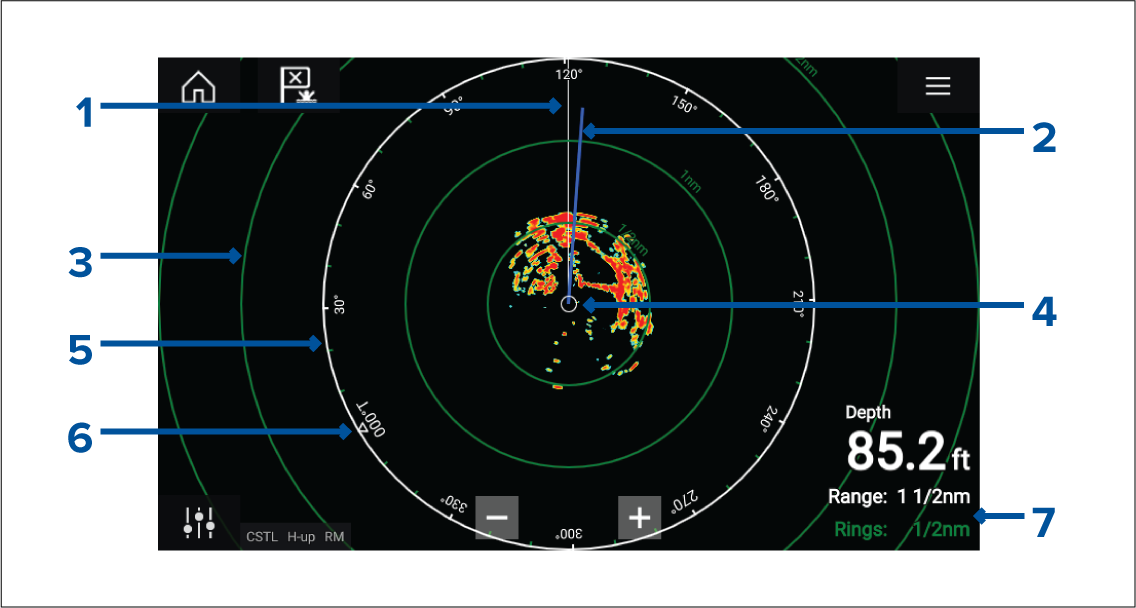
SHM (Ships heading marker).
COG/SOG line (Points in the direction of travel (COG), with the length of the vector providing an indication of speed (SOG)).
Range rings.
Vessel position.
Azimuth ring (The White ring identifies the distance from your vessel to the top edge of the screen. Bearing indicators are also provided around the ring).
North indicator (Always points North).
Current displayed Range and Ring separation distance (Range: identifies the distance from your vessel to the top edge of the screen. Rings: identifies the distance between each Range Ring).
The displayed range can be adjusted at anytime using the Range controls.
Range rings can be switched off from the Presentation tab:
You can also choose whether to display a numerical range indicator against each ring using the Range ring labels: option.