Range rings
Range rings are evenly spaced concentric circles displayed on the screen that are centered on your vessel. Range rings enable you to easily estimate the distance between two points on the Radar screen.
Range ringsRadarRange ringsBy default range rings are set to automatic with the number of range rings displayed and spacing between them determined automatically by the Radar app’s range.
RadarRange ringsPreferred numberThe Range ring mode can be changed to Preferred number. When preferred number is selected you can specify your preferred number of range rings (i.e.: 2, 4, or 6). The number of preferred rings includes the azimuth ring.
Due to the relationship between range and ring spacing it is not always possible to display the preferred number at all ranges.
Range ring settings can be accessed from the Presentation tab: .
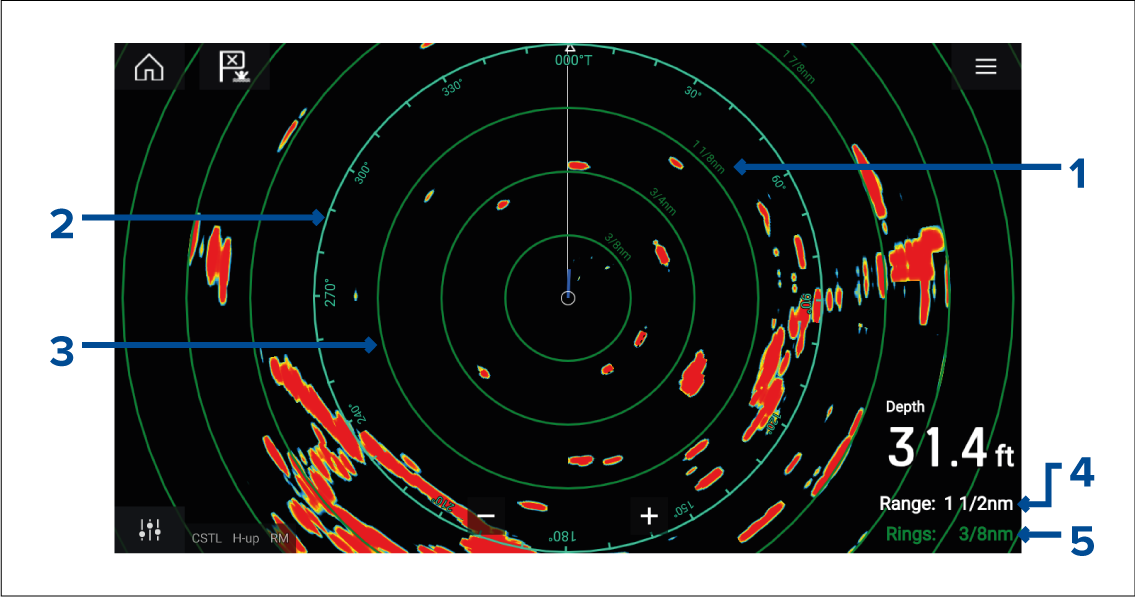
Range ring distance — each range ring includes the distance from your vessel.
Azimuth ring — The azimuth ring is the outermost range ring on the screen and is the farthest complete ring on the screen.
Range ring — evenly spaced concentric rings.
Range — shows the range displayed onscreen and is also the distance that the azimuth ring is placed at.
Rings — identifies the distance between each ring.