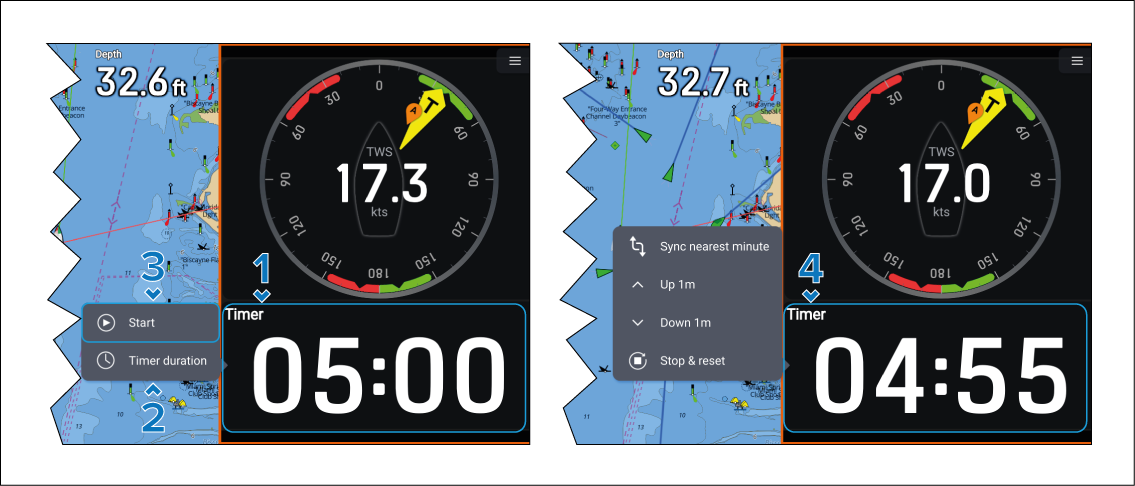
A race timer is used to count down until race start and
track how long the race has been in progress.
Sailing Race timerRace timerUsing
- Select the Race timer data item.
- Select Timer duration to adjust the
countdown time (default is 5 minutes).
The Race timer can be set from 1 minute to 30 minutes.
- Select Start to begin the countdown.
While the race timer is running the following audible beeps
will occur:
Double beep every minute.
Treble beep at the start of the last 30 seconds.
Single beep every second for the last 10 seconds.
Long beep when timer reaches zero.
When zero is reached the timer will start counting up.
- While the race timer is running selecting the race timer
will provide the following options in the pop-over menu:
Sync nearest minute — Selecting will
round the current value to the nearest whole minute.
Up 1m — Increase the current value by
1 minute.
Down 1m — Decrease the current value
by 1 minute.
Stop & reset — Stop the race timer
and reset the value to the time specified in Timer duration.