Pilot set-up — Calibration settings
Autopilot calibration settings can be accessed from the Pilot set-up settings menu.
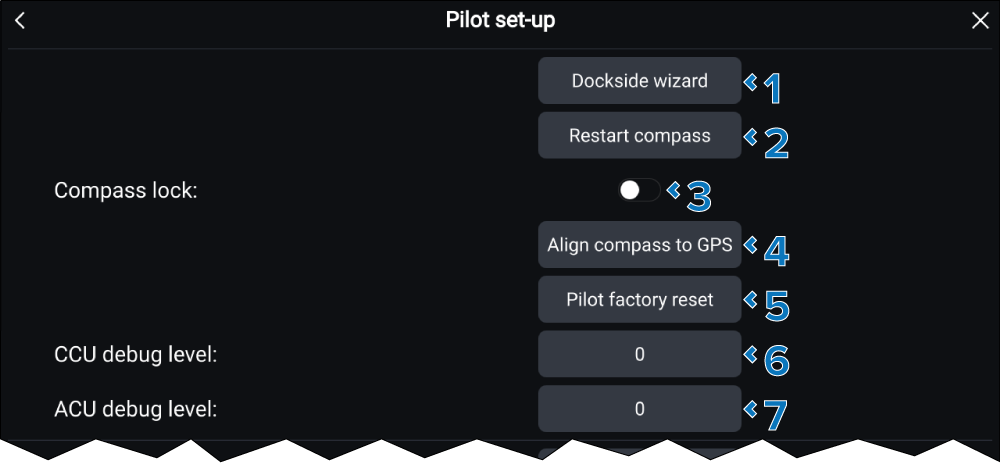
Pilot set-upCalibrationThe following calibration settings are available:
Setting |
|
|---|---|
1 |
Dockside wizardDockside wizard Dockside calibration must be carried out before using your autopilot for the first time. The Dockside wizard guides you through this calibration process. The steps included in the dockside wizard are dependent on whether you have a rudder reference transducer fitted to your vessel. The steps can include the following steps:
Select the button and follow the onscreen instructions to perform the Dockside calibration. |
2 |
Restart compassCompassRestart Select the button and follow the onscreen instructions to restart the compass linearization procedure. |
3 |
Compass lockCompassLock When enabled the compass linearization will be locked so that further automatic linearization is not performed. |
4 |
(1)Align compass to GPSCompassAlignment If your system has a GNSS receiver connected, the autopilot is tuned to the receiver’s heading while you steer to a known magnetic heading. This step provides a rough alignment and minimizes the amount of compass fine tuning required. As part of the Align compass to GPS process, the autopilot will compare the average heading with the average COG (Course Over Ground) value reported by the source of the position data, and set an offset value so that the heading matches the provided COG value. Select the buttons and follow the onscreen instructions to align your compass with your GPS heading. |
5 |
Pilot factory resetAutopilotReset Reset your autopilot’s settings to factory default values. |
6 |
(1)CCU debug levelAutopilotDebug The debug level should only be set when requested by Technical Support as part of a troubleshooting process. |
7 |
(1)ACU debug levelAutopilotDebug The debug level should only be set when requested by Technical Support as part of a troubleshooting process. |
(1) These settings are NOT available when the Calibration lock is set to On.