Pilot set-up — Rudder and turn settings
Rudder and turn related settings are accessed from the Pilot set-up settings menu.
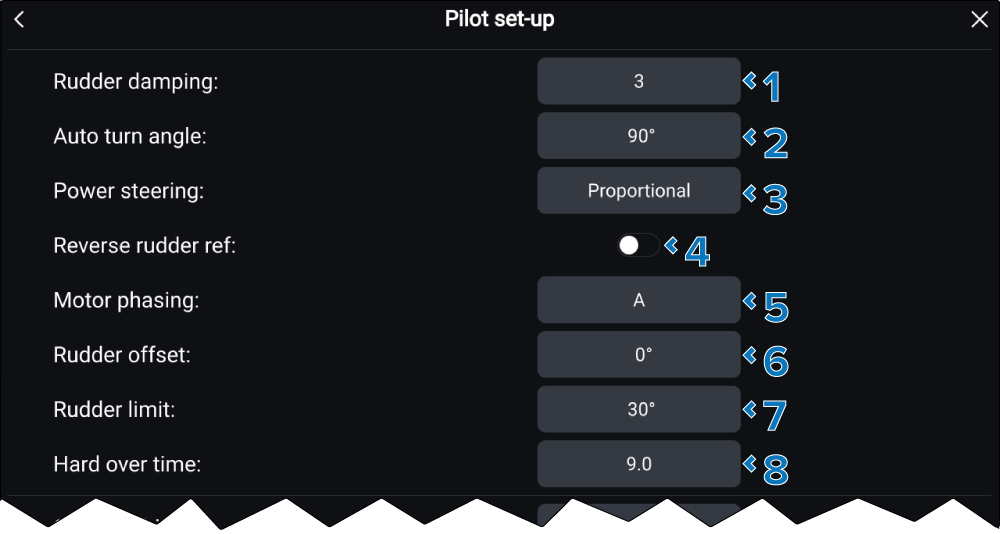
Pilot set-upRudder settingsTurn settingsThe following settings are available:
Setting |
|
|---|---|
1 |
(1)Rudder damping RudderDamping Rudder damping is used to prevent the autopilot from “hunting” maneuvers. Always use the lowest acceptable value. For more information, refer to: Rudder damping levels and deadband angles The default value is 3. The value can be adjusted from 1 to 9, with 1 being the lowest amount of damping. |
2 |
(1)Auto turn angle Auto turn Determines the amount of course change when performing an auto turn The default value is 90°. The value can be adjusted from 10° to 125°. |
3 |
(2)Power steering Power steering Determines the behavior of the Rotary or Joystick. By default this setting is Off. The setting can be changed to either Proportional, or Bang Bang. |
4 |
(2)Reverse rudder ref RudderReverse reference When enabled the rudder reference indicator graphic is inverted. |
5 |
(1)Motor phasing Motor phasing Switches the polarity of your drive motor. Use if your drive polarityDrive polarity is inverted. The options are A, or B. |
6 |
(2)Rudder offset RudderOffset Adjust to specify the rudder offset from amidships. The offset can be adjusted from -9° to +9°. |
7 |
Rudder limitRudderLimit Specifies how far the rudder can move before hitting its end stops. The value should be set to approximately 5° less than your maximum rudder angle. The default value is 30°. The limit can be adjusted from 10° to 50°. |
8 |
Hard over timeHard over time Specifies the time it takes for the rudder to move from hard port to hard starboard and vice versa. The default value is determined by your Drive type selection. The value can be adjusted from 1.0 seconds to 100.0 seconds. |
(1) These settings are NOT available when the Calibration lock is set to On.
(2) These settings are only available when a Rudder reference transducer is connected.