Pilot set-up — Autopilot configuration settings
Configuration settings for your autopilot can be accessed from the Pilot set-up settings menu.
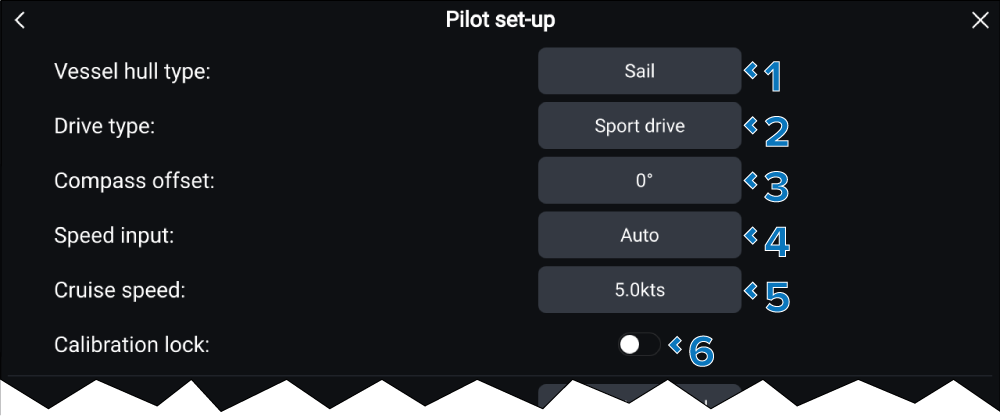
Pilot set-upPilot configurationThe following configuration settings are available:
Setting |
|
|---|---|
1 |
Vessel hull typeVessel hull type Selecting a hull type which is the closest match for your vessel provides optimum steering performance.
Vessel hull type also determines whether the Automatic turning to next waypoint feature is available. |
2 |
Drive typeDrive type Select the drive type that closely matches your vessel’s drive to provide optimum drive performance. |
3 |
Compass offsetCompassOffset Adjust the Compass offset so that your autopilot’s heading matches the ship’s compass. A second display capable of showing autopilot heading is required. Compass offset is adjusted automatically during the Align compass to GPS procedure. The default value is 0°, the setting can be adjusted from -10° to +10°. |
4 |
(1)Speed inputSpeed input Select the source for your autopilot’s speed data.
|
5 |
(1)Cruise speedCruise speed Set a speed which represents your vessel’s typical cruising speed. The cruise speed can be set between 4.0 kts to 60.0 kts. |
6 |
Calibration lockCalibration lock The calibration lock is used to lock out specific calibration settings which if changed may require recommissioning of the autopilot system. If your system has been dealer installed then the lock may already be enabled. |
(1) These settings are NOT available when the Calibration lock is set to On.