Navigating to a waypoint or point of interest (autopilot)
Navigating to a waypoint or point of interest (autopilot)
You can navigate to a waypoint or a point of interest by
performing a Goto. When autopilot integration is
enabled, performing a Goto will commence active
navigation which will guide you to a selected destination and controls
will be available to engage your autopilot.
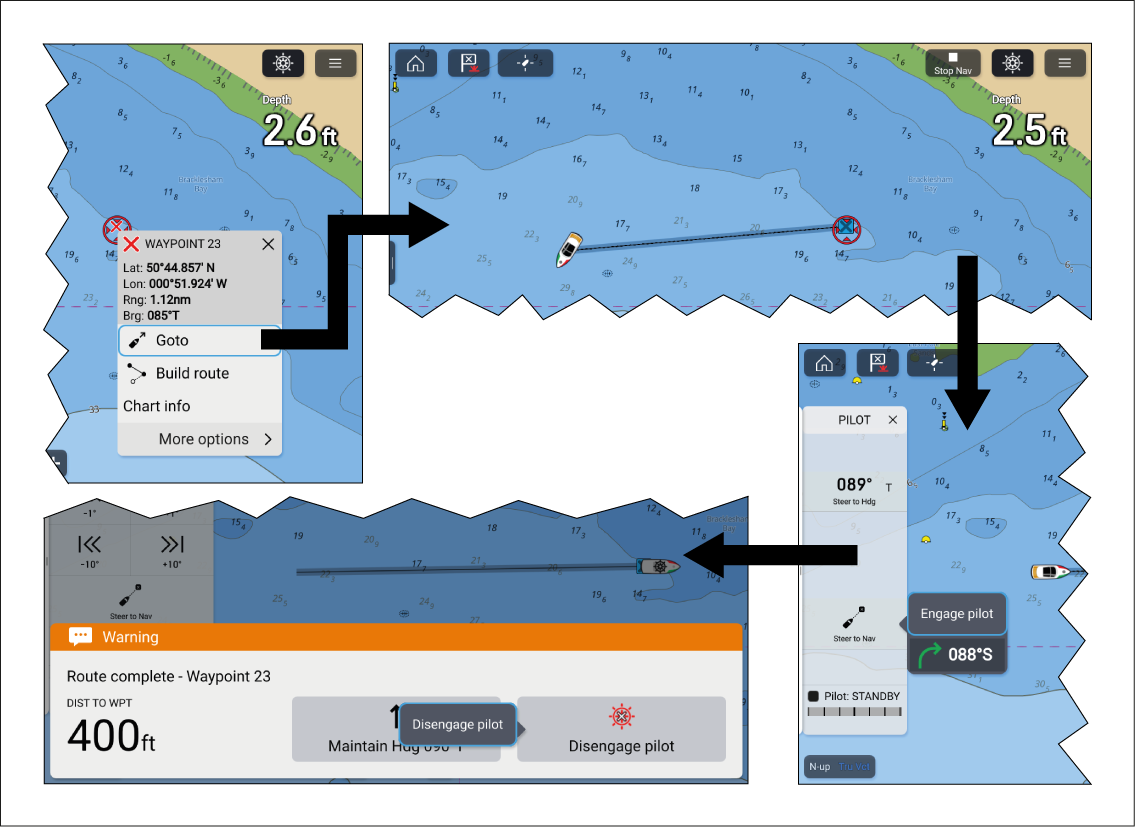
Follow the steps below to perform a Goto using autopilot steering:
WaypointGotoGoto waypointNavigating
Select and hold on the waypoint or point of interest and
select Goto from the context menu.
If required, engage the mechanical drive by either engaging
the wheel drive’s clutch or attaching the pushrod onto the tiller
pin.
Select the Pilot icon located at the
top of the screen.
Select Steer to Nav from the Pilot sidebar.
Select Engage pilot.
Your vessel will turn and navigate to the selected
point.
The waypoint arrival alarm will trigger when your vessel
reaches the Waypoint arrival radius (pilot in track mode).
The waypoint Arrival radius (pilot in track mode) can be set from the Alarms manager: Homescreen > Alarms > Settings > Arrival radius (pilot in track mode). The Arrival radius (pilot in track mode) overrides the standard Arrival radius notification.
Select Disengage pilot from the notification
and then Disengage pilot from the pop-over.
Alternatively, select Maintain Hdg from
the notification and then Engage pilot from the
pop-over to maintain a locked heading on the current course.
Select the Stop Nav onscreen icon located
at the top of the screen or select Stop from the
context menu or Navigation menu to end active navigation.
You can end active navigation at any time by selecting
the Stop Nav onscreen icon located at the top of
the screen or selecting Stop from the context menu
or Navigation menu.
For more information
on waypoints and waypoint management refer to: Waypoints