Importing Waypoints or Routes over NMEA 2000

Follow the steps below to Import Waypoints or Routes over an NMEA 2000 / SeaTalkng® network.

Note

LightHouse 3 and LightHouse 4 MFDs allow more than 1 waypoint or route to have the same name. It is recommended that you check that the import will not create waypoints or routes with the same name and if necessary rename them before importing.
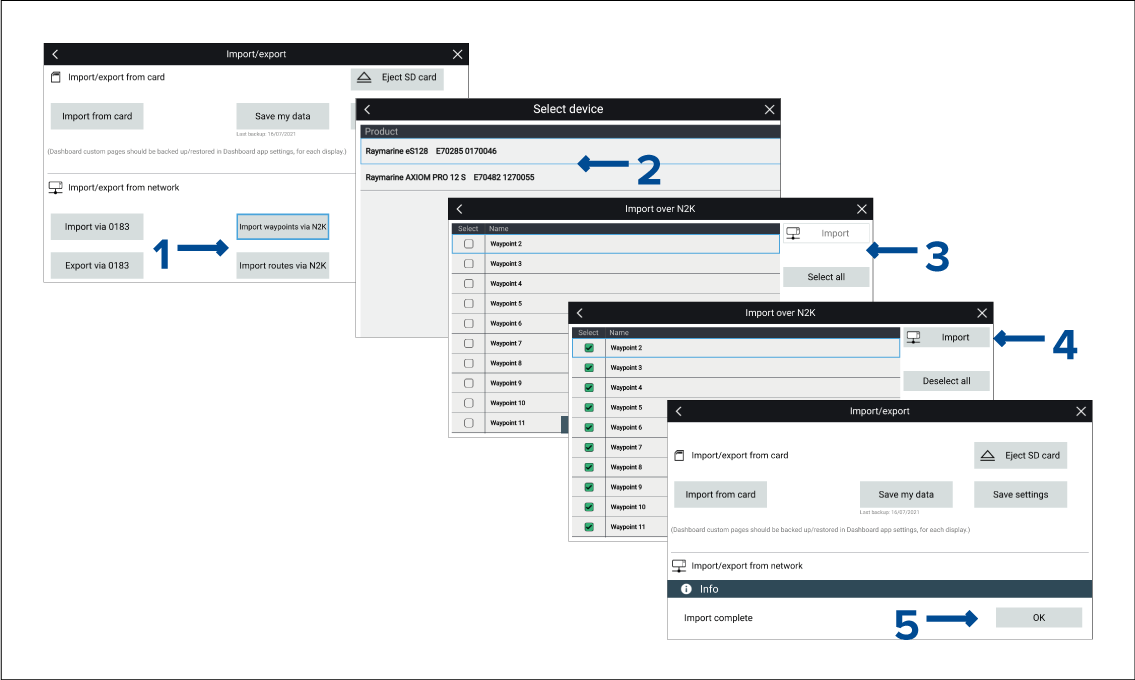
Figure 1. Example importing waypoints

From the Import/export menu: Homescreen > My data > Import/export:
  1. Select either Import waypoints via N2K or Import Routes via N2K.
  2. Select the device from the list that has the waypoints or routes that you want to import.
    Note

    If there is only 1 compatible device connected then this step will be skipped.

    A list of Waypoints or Routes on the selected device will be displayed.

  3. Select each waypoint or route that you want to import, or select Select all.
  4. Select Import.
  5. Select OK on the import confirmation dialog.

The selected waypoints or routes will now be available on the MFD.