iKey Bluetooth keyboard controls
The display is compatible with the iKey Bluetooth keyboard. When connected, the Bluetooth keyboard can be used to control the display.
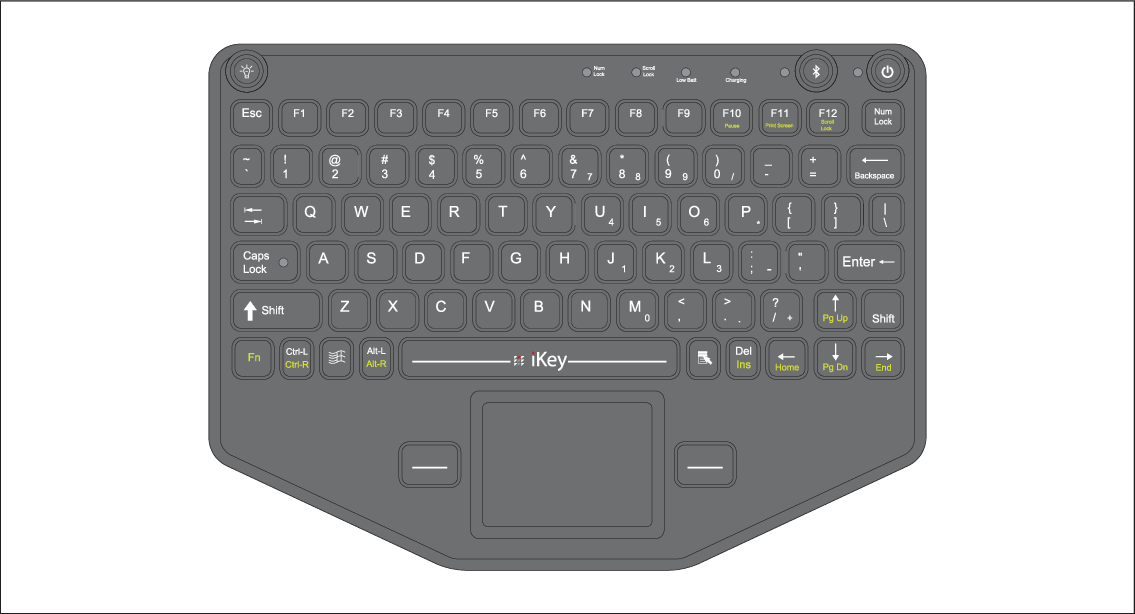
In addition to typical alphanumeric keyboard functions, the keyboard provides a mapping of the display’s physical buttons, as follows:
F4 — User Configurable Key (available on chartplotters that have physical keys)
Press and hold — Choose action for button
F6 — Power/Shortcuts
Press and hold — shut down
F7 — Home
F8 — Event marker / Waypoint
F9 — Menu (App specific menu)
F11 — Switch Active
F12 — Pilot
Esc — Back
Enter — OK
Up arrow — UniControl Up
Down arrow — UniControl Down
Left arrow — UniControl Left
Right arrow — UniControl Right
Trackpad — Touchscreen / UniControl directions
Trackpad + Left trackpad button — Pan chart area (Chart app)
Trackpad + Right trackpad button — Pan chart area (Chart app)
Left trackpad button — Select / OK
Press and hold — long press (touchscreen)
- Right trackpad button — OK
Press and hold — long press (touchscreen)
> — Increase display brightness (when Shortcuts page is displayed) / back sonar scroll-back bar in Fishfinder app
< — Decrease display brightness (when Shortcuts page is displayed) /forward sonar scroll-back bar in Fishfinder app
+ — Range / Zoom In
- — Range / Zoom Out
Pg Up (Fn + Up arrow) — Range / Zoom In
Pg Dn (Fn + Down arrow) — Range / Zoom Out