RMK controls
Displays can be controlled remotely using an RMK-9 or RMK-10.
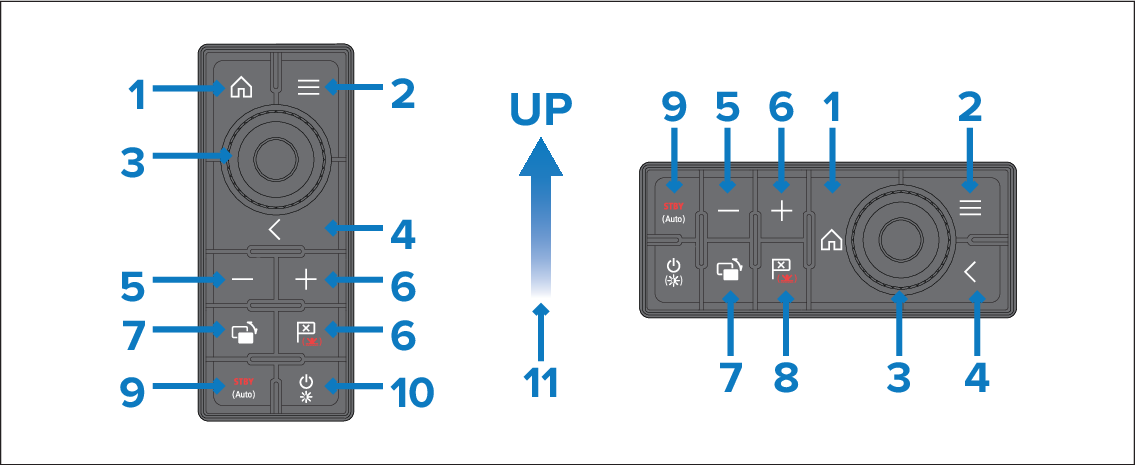
Home — press to return to the Homescreen.
Menu — press to access menus. Press again to close menus.
UniController — provides a rotary control and a joystick that includes an OK push button for using menus and applications.
Back — press to return to a previous menu or dialog level.
- (Minus/Negative symbol) — press to range out.
+ (Plus/Positive symbol) — press to range in.
Active — press to switch the active pane, or to switch the active display (in multiple display systems).
Waypoint / MOB — press and release to access the waypoint options. Press again to place a waypoint. Press and hold to place a Man Overboard (MOB) marker at your current position.
Standby (Auto) — press to disengage integrated autopilot, press and hold to activate Auto mode on integrated autopilot.
Power — see table below:
Single display
Display state
Momentary press
Press and hold
Off
Not applicable
Not applicable
On
Open Shortcuts page
Power off / put into Standby
Multiple displays
Display state
Momentary press
Press and hold
All displays Off
Not applicable
Not applicable
All displays On
Open Shortcuts page on active display
Power down all displays
1 display on and 1 display off
Open Shortcuts page on active display
Power down active display
NoteDisplays that are switched off must be switched back on using the display’s Power button.
Direction of Joystick Up.