Connecting a Bluetooth keyboard to Axiom-Series displays
Follow the steps below to connect a Bluetooth keyboard to Axiom-Series displays.
Note
The steps below describe connecting the ikey Bluetooth keyboard. Other Bluetooth keyboards may be connected in a similar way, but Raymarine does not guarantee compatibility.
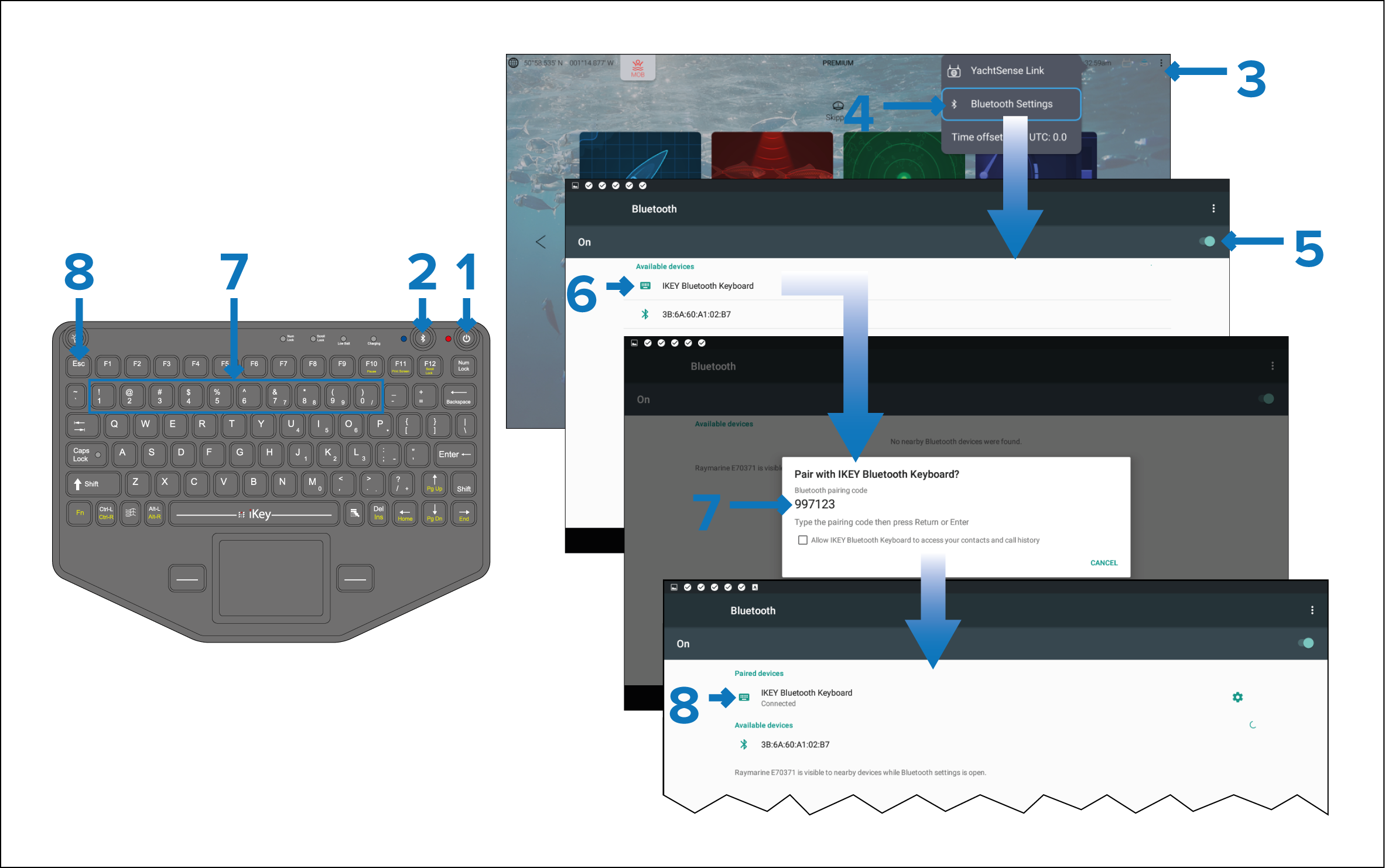
- Press and hold the Power button for approximately 4 seconds, until the power button LED flashes red.
- Press and release the Bluetooth button.
- From the display, select the status area located on the top right of Homescreen.
- Bluetooth SettingsSelect Bluetooth Settings.
- Enable Bluetooth using the toggle switch.
- Select the Bluetooth keyboard from the list of discovered devices.
- Using the keyboard, enter the pairing code displayed on the display screen, and press Enter.
- Once connected, press the Esc button on the keyboard to return to the Homescreen.