Field of View
The Field of View (FOV) cone acts as a range indicator to illustrate the area of coverage of the camera with respect to displaying chart objects in the Video app as part of the ClearCruise™ Augmented Reality features.
ChartField of View (FOV)
Chart objects that are within the scope of the displayed FOV cone will be displayed in the Video app as “flags”. For more information on flags, refer to Augmented Reality flags
The area of coverage of the FOV cone is determined by:
The camera’s horizontal Field of View (FOV). This setting can be adjusted in the Video app:
.The Augmented Reality Range Limit. For more information refer to: Range limit
You can also manually specify the maximum range limit. When you adjust this setting, the FOV cone in the Chart app will change accordingly. For more information, refer to: ClearCruise settings (Augmented Reality)
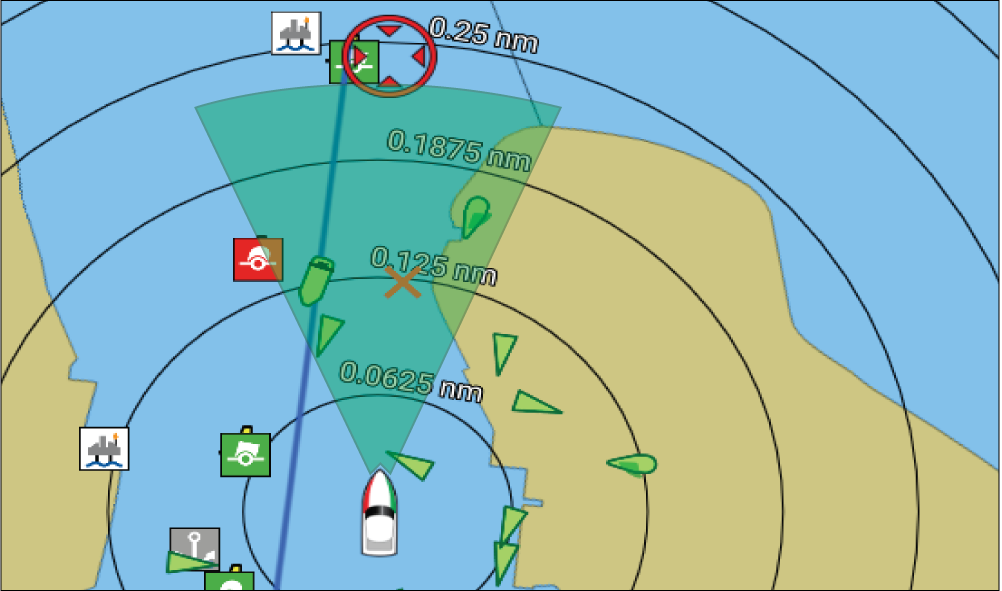
The FOV cone can be enabled/disabled in the Chart app settings: .