Augmented Reality flags
ClearCruise® Augmented Reality displays Augmented Reality Flags over AIS Targets, Waypoints and Chart objects in the Video app.
Augmented RealityFlags
All flags uses icons and shows your vessel’s range from the target’s location.
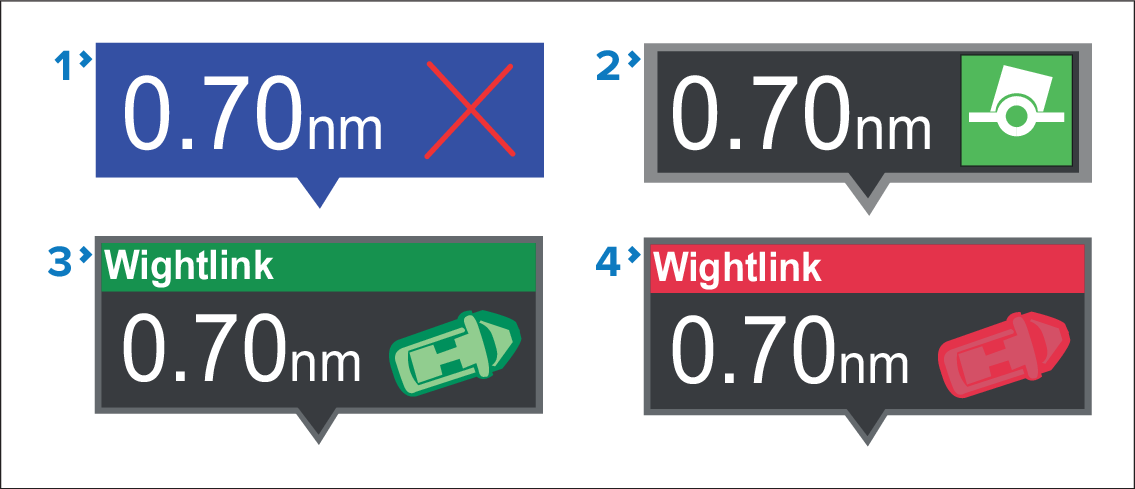
Waypoint flag
Chart Object flag (buoy)
AIS Target flag (passenger ferry; icon points in the direction of travel relative to the camera feed)
Dangerous AIS Target flag (passenger ferry; icon points in the direction of travel, relative to the camera feed)
AIS flags update periodically; however, accurate placement is not guaranteed.
Flag controls
Onscreen controls are provided to control which flags are displayed.

Enable/disable flags for AIS targets.
Enable/disable flags for Waypoints.
Enable/disable flags for chart objects.
Specify the maximum range within which flags are automatically displayed.