Electric propulsion page
The electric Propulsion page is available when the Propulsion system has been set to Electric. The number of motors (1 or 2) displayed on the page is based on the number of motors selected during the display’s initial start up wizard. The Propulsion page includes data relevant to electric propulsion system and includes the graphical dials.
Dashboard app Propulsion pagePropulsion page The Propulsion system and number of motors can be configured during the initial Start up wizard and also at anytime from the Boat details settings menu.
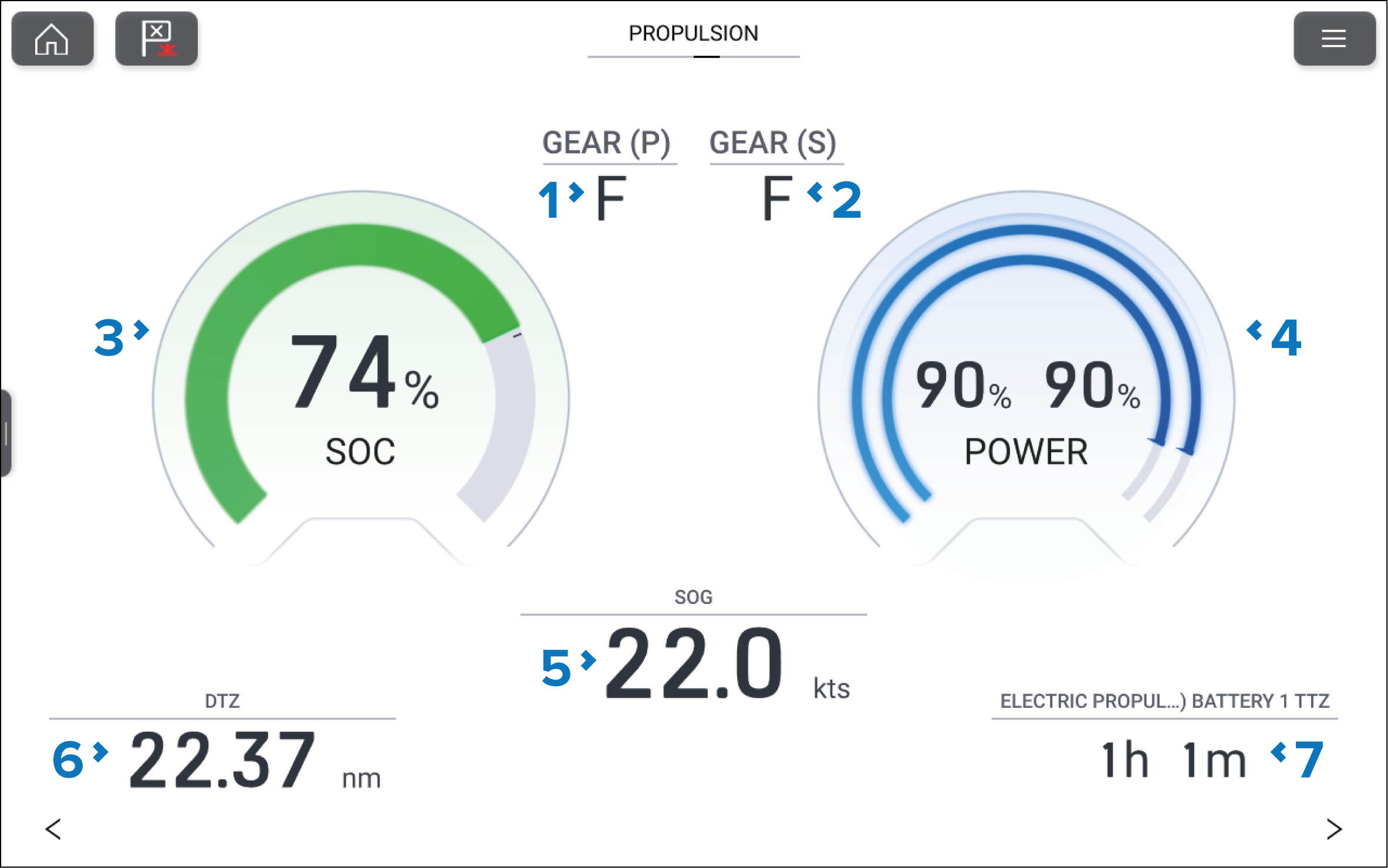
Figure 1. Example Propulsion page
Port motor gear.
Starboard motor gear.
SOC (State Of Charge) dial.
Power dial.
SOG (Speed Over Ground).
DTZ (Distance To Zero)
TTZ (Time To Zero)
The dials and their contents are unique to the propulsion page and cannot be reproduced on other data pages. The dials cannot be removed or hidden.
The Propulsion page will show transmission gear and power for up to 2 motors.