Depth contours
Depth contours, also known as bathymetric contours or depth curves, are lines drawn on cartography that connect points of equal depth creating a visualization of underwater bottom structure. Contours use color fills to indicate depth in relation to other contours.
Raster charts
Depth contoursOn Raster charts, depth contours are fixed and are always displayed.
Vector charts
Depth contourOptionsOn Vector charts, depth contours can be customized from the Depths settings menu: .
Depth contours include Depth soundings. The Depth contour soundings are differentiated from other Depth soundings by using a white outline.
The following Depth contour options are available:
None — No Depth contour lines or depth contour soundings are displayed.
Manual — Depth contours are only shown from zero to the depth specified in the Zero to: option.
All — All Depth contours are displayed.
The Depth contours option does not affect the contour fill color.
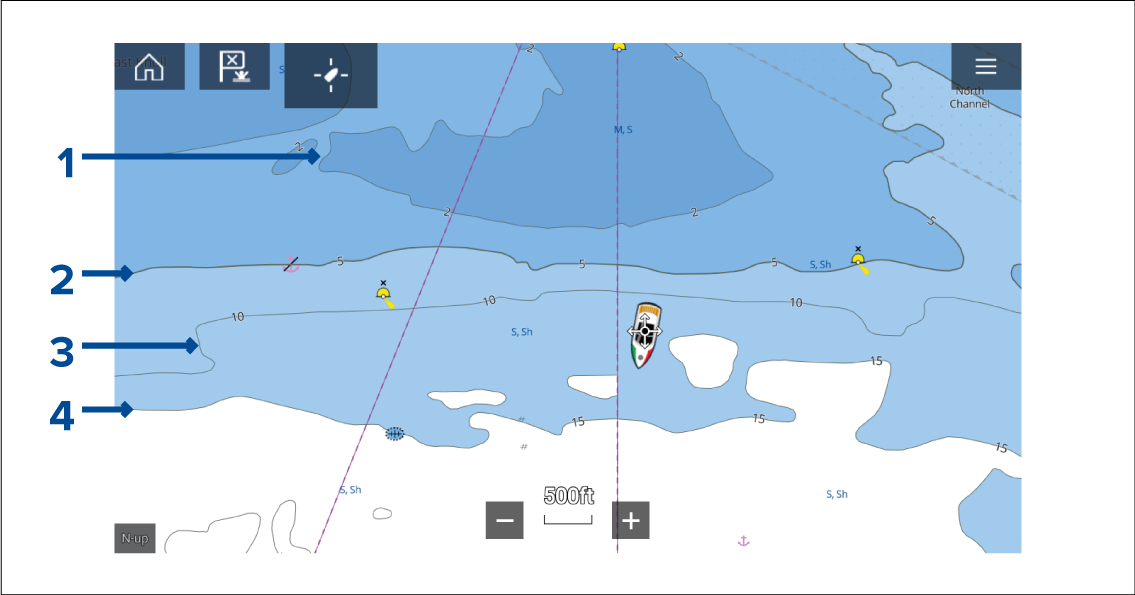
Figure 1. Example LightHouse Charts depth contours
Shallow contour — Depths from zero to the depth specified in the Shallow contour setting will be within the Shallow contour. By default, the Shallow contour uses the darkest shade of blue.
Safety contour — Depths from the Shallow contour to the depth specified in the Safety contour setting will be within the Safety contour. The Safety contour uses a thicker line than other contour lines and is colored using a medium shade of blue.
ImportantThe Safety contour should be set to the same value as your vessel’s Minimum safe depth and should be used to identify areas where you should not take your vessel.
Depth contour — All Depth contours consist of a line and depth soundings that appear along the line.
Deep contour — Depths from the Safety contour to the depth specified in the Deep contour setting will be within the Deep contour. By default, the Deep contour uses the lightest shade of blue. By default, depths greater than the Deep contour will be colored white.
Shallow contour, Safety contour and Deep contour values can be customized from the Depths settings menu: .
Depth gradient
By default, the color gradient used for depth contours is Dark to Light, as described in the example above. If required, the Depth gradient can be changed to Light to Dark, which will invert the colors so that white is used for the Shallow contour, and the darkest shade of blue is used for depths deeper then the Deep contour value.
The Depth gradient can be changed from the Depths settings menu: .
Charts from different cartography vendors will handle depth contours differently.