Navionics depth contours
When using Navionics® charts depth contours are automatically colored using a blue color gradient with the shallowest contour using the darkest shade and the deepest using white.
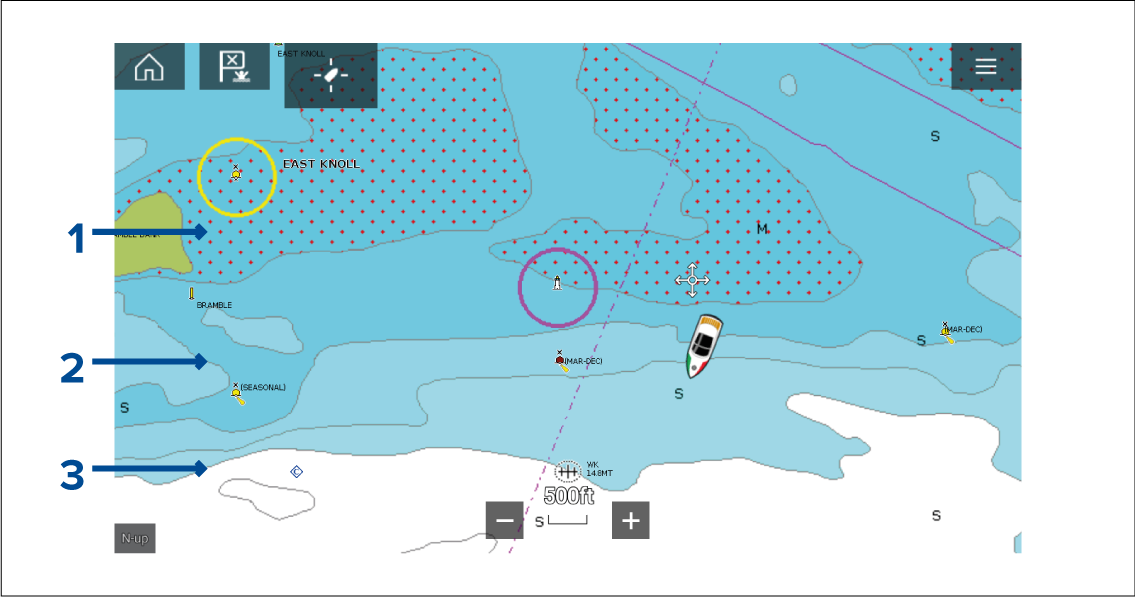
Figure 1. Example Navionics® Charts Depth contours
Shallow area — When the Shallow area feature is enabled all depths from zero to the depth specified in the Zero to: setting will use red cross hatching to identify shallow areas.
Depth contour — All depth contours are identified using a line and a blue color fill gradient.
Deep contour — All depths deeper than the depth specified in the Deep contour: setting is colored white by default.
Deep water color
The color used for the Deep contour can be set to either white or blue. When set to blue the Deep water contour will use the lightest shade of blue.
The depth contour settings can be accessed -from the Depths settings menu: .