Data response settings
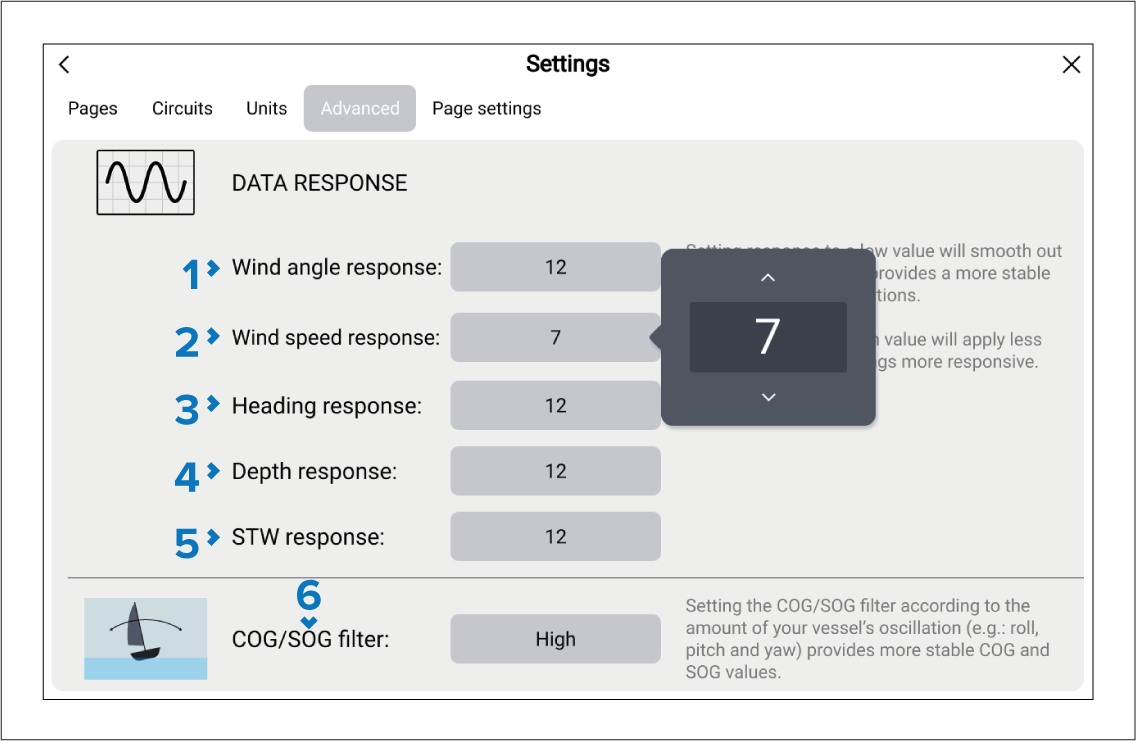
The Advanced settings menu allows you to specify how responsive certain data items are to change i.e.: the rate at which the data is updated.
Setting the response to a low value will smooth out data fluctuations. This provides a more stable reading of current conditions.
Setting the response to a high value will apply less damping, making readings more responsive.
Data app Data responseDashboard app Data responseData response (damping) settings are available for the following data:
Description |
|
|---|---|
1 |
Wind angle responseData app Wind angle responseDashboard app Wind angle response |
2 |
Wind speed responseData app Wind speed responseDashboard app Wind speed response |
3 |
Heading responseData app Heading responseDashboard app Heading response |
4 |
Depth responseData app Depth responseDashboard app Depth response |
5 |
STW response Speed Through WaterData app STW responseDashboard app STW response |
6 |
COG/SOG filterData app COG/SOG filterDashboard app COG/SOG filter |
The data response settings can be set from 1 to 15, with 12 being the default.
Setting the COG/SOG filter according to the amount of your vessel’s oscillation (e.g.: roll, pitch and yaw) provides more stable COG and SOG values. The available options are: Low, Medium and High.