Goto flag
Selecting Goto on a selected Augmented Reality flag will plot a direct course to the flag’s last known location.
Augmented RealityGoto flag
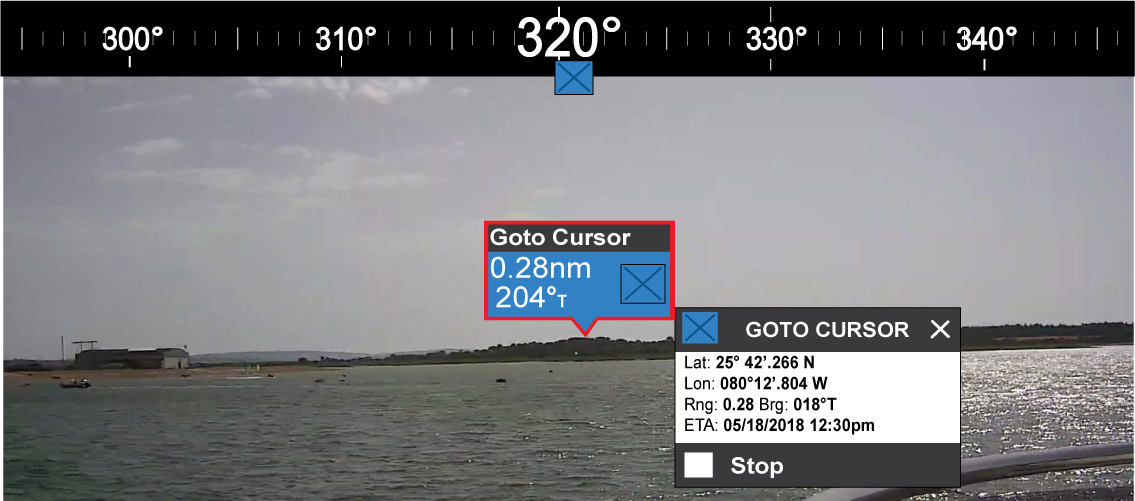
A Goto flag will appear in the last known location of the selected flag in both the Video and Chart apps, and in the Video app’s Compass bar. The flag is displayed with a Goto icon, as a blue copy of the original flag.
Selecting the Goto flag makes it a selected flag, and also displays a context menu providing more information about the location of the flag, and the option to stop a goto action.
Augmented RealityCompass bar
Selecting Stop removes the Goto flag from the Video app and Chart app.
If the camera loses sight of the Goto flag, it will display red and green navigational arrows on the Compass bar, indicating whether you need to turn port or starboard to regain sight of the flag. However, this only works if the camera is forward-facing.