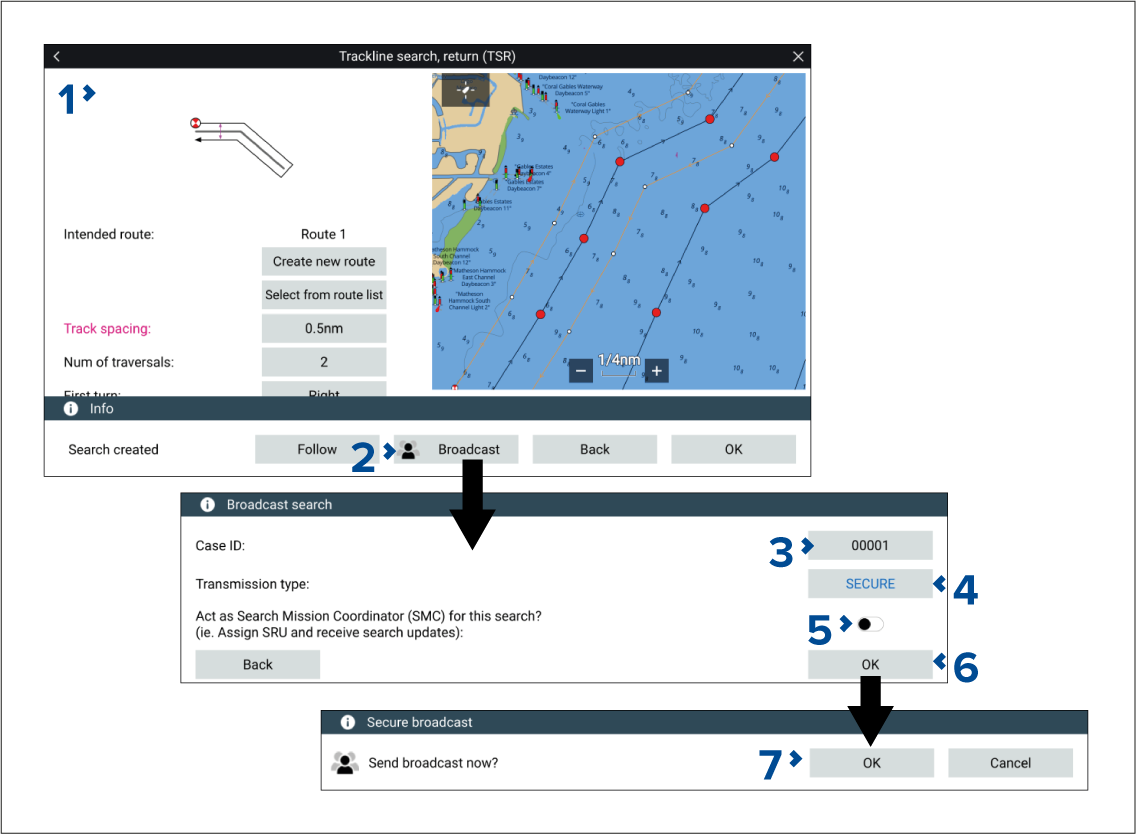
To broadcast a SAR pattern where no SMC and SRU is assigned,
follow the steps below:
- Create a SAR pattern. For details refer to: SAR (Search and Rescue)
patterns
- After selecting Create search route,
select Broadcast.
- If required, change the Case ID.
The case ID will automatically increment, however it can
also be assigned manually by selecting the case ID field.
- If required, change the Transmission type.
Depending on AIS mode, SAR patterns can be broadcast as a Secure or Non-secure transmission:
In AIS restricted mode only, secure SARs can be sent.
In AIS normal mode, you can choose whether to send as secure
or non-secure.
In AIS receive only mode, SAR patterns cannot be sent.
Secure broadcasts will only be received by vessels using the
same STEDs passphrase. Non-Secure broadcasts can be received by all
vessels with STEDs-compatible hardware.
- Ensure SMC (Search Mission Coordinator)
is disabled.
- Select OK.
- Select OK.
The SAR pattern is broadcast.
Existing SAR patterns
can be broadcast from the searches list: . Select the SAR pattern and choose Broadcast from
the pop-over menu.