SAR pattern receipt (un-managed / not assigned as SRU)
When you receive an un-managed SAR pattern, or a managed SAR pattern where you are not the assigned SRU, the SAR pattern can be imported and, if required, followed.
SAR patternReceiptWhen a SAR pattern is received, a notification is displayed onscreen.
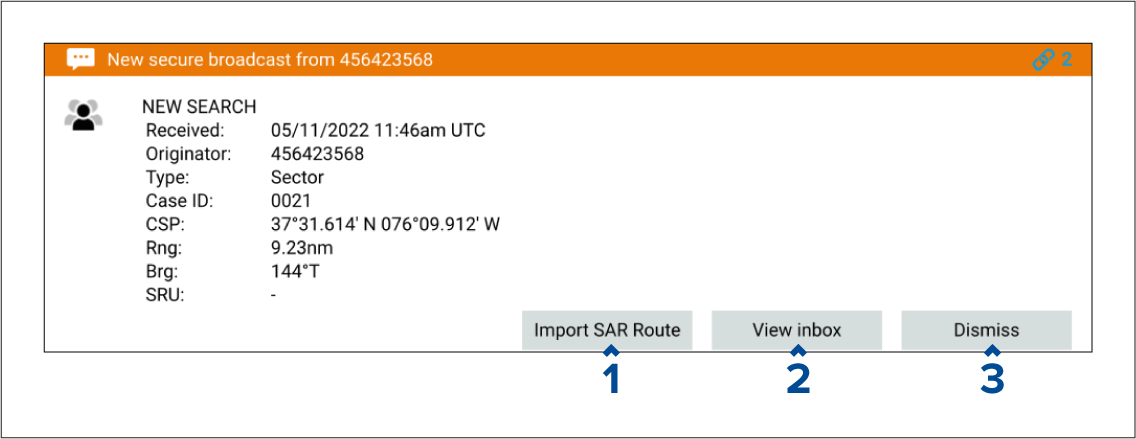
The notification provides details about the SAR pattern and the following options:
Import SAR Route — Imports the SAR pattern so that it can be displayed in the chart app.
View inbox — Closes the notification and opens the messages inbox so that you can view the related message. The search can be imported by using the inbox message options.
Dismiss — Selecting dismiss will close the notification. The search can be imported by using the inbox message options.

Once a SAR pattern is imported, it can be followed by selecting Follow route or, if the chart app is open, it can be viewed onscreen by selecting Show on chart. If you select Dismiss the SAR pattern can be followed at a later time from the searches lists.
For more information about SAR patterns, refer to: SAR (Search And Rescue) patterns
When performing a search on an un-managed SAR pattern, the broadcaster will not receive automatic progress updates in the same way as for a managed search, therefore you may be required to provide regular manual updates using STEDs messaging.