Axiom 2 Pro controls
Axiom® 2 Pro displays are controlled using both a touchscreen and physical buttons. The details below describe the buttons and their functions.
The display is supplied with the Pilot lower keypad fitted. The optional user-programmable lower keypad is also supplied in the box.DisplayControlsButtons
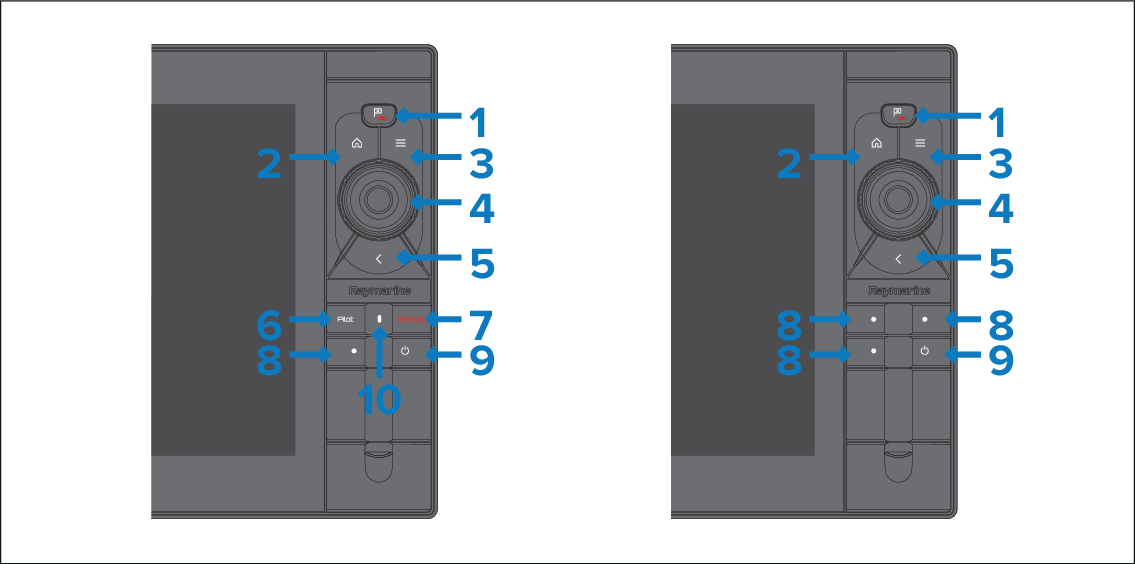
Waypoint / MOB — Press momentarily to place a waypoint at your vessel’s location. A long press activates the Man overboard (MOB) alarm.
Home — Press to show the Homescreen.
Menu — Press to open or close menus.
Uni-controller — The Uni-controller consists of a center OK button, Directional controls and a Rotary knob.
Back — Press to return to the previous menu or dialog.
Standby — Press to disengage active autopilot.
Pilot — Press momentarily to show or hide the Pilot sidebar. A long press engages the autopilot in locked heading mode.
User configurable keys — Press and hold each button to assign a function. Press the button to perform the assigned function.
NoteThe default Pilot lower keypad has one user-configurable key. The user-configurable lower keypad has 3 configurable keys.
Power — Press to switch on the display. When the display is switched on, pressing this button opens the Shortcuts page.
Pilot status — LED providing pilot status. For details, refer to: Pilot keypad LED status (Axiom® 2 Pro only)