Autopilot settings — power boats
The Autopilot settings menu provides settings related to the autopilot.
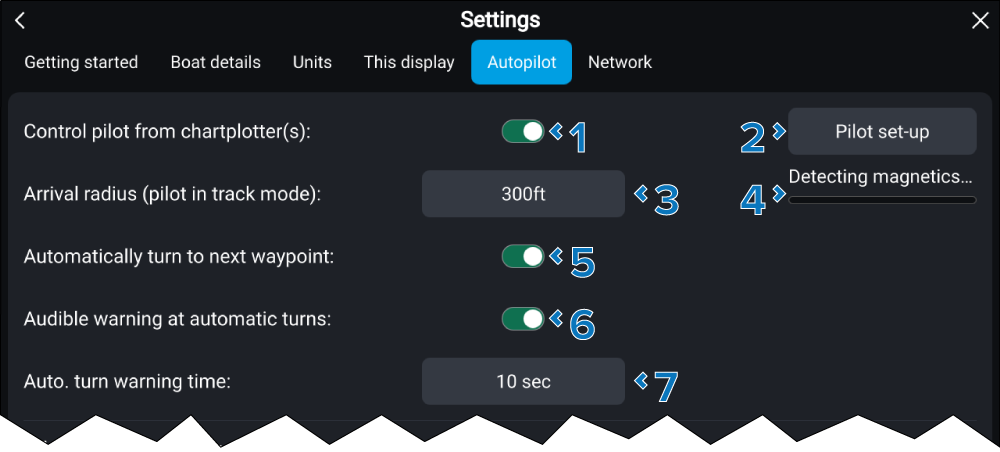
Autopilot controlPower boatsWhen either Power, Power (slow turn), or Power (fast turn) has been selected in the setting the following options are available:
Setting |
|
|---|---|
1 |
Control pilot from chartplotter(s) Enable and disable Autopilot control from chartplotters. |
2 |
Pilot set-up Select to access autopilot settings. For more information refer to: Autopilot settings — Pilot set-up menu |
3 |
Arrival radius (pilot in track mode) Specify the distance from a destination waypoint at which the waypoint arrival alarm will trigger. |
4 |
Calibration status Only shown while autopilot calibration is in progress. |
5 |
(1)Automatically turn to next waypoint Enable and disable automatic turning when following a route. For more information refer to: Automatic turning |
6 |
(1)Audible warning at automatic turns Enable and disable an audible warning when the Automatic turn timeout reaches zero. |
7 |
(1)Automatic turn timeout Specify the amount of time between the waypoint arrival distance being reached and the automatic turn occurring. |
(1) These settings are NOT available when the Vessel hull type has been configured using one of the sailing vessel options.