Automatic turning
Automatic turning enables Evolution-Series autopilots to automatically turn to the next waypoint in a route. When the current waypoint arrival radius has been reached a countdown will commence, and when it reaches zero the vessel will automatically turn toward the next waypoint.
The Automatic turning feature requires your Evolution-Series autopilot to be running software version 3.14 or later and your display to be running LightHouse v4.4.70 or later.
Automatic turning is NOT available when the autopilot is configured using a Sail Vessel hull type.
Waypoints must be farther apart than the Arrival radius (pilot in track mode) distance.
Automatic turning is disabled by default. Automatic turning can be enabled and configured from the Autopilot settings menu: .
During active navigation, Automatic turning can also be enabled and disabled from the Navigation menu: .
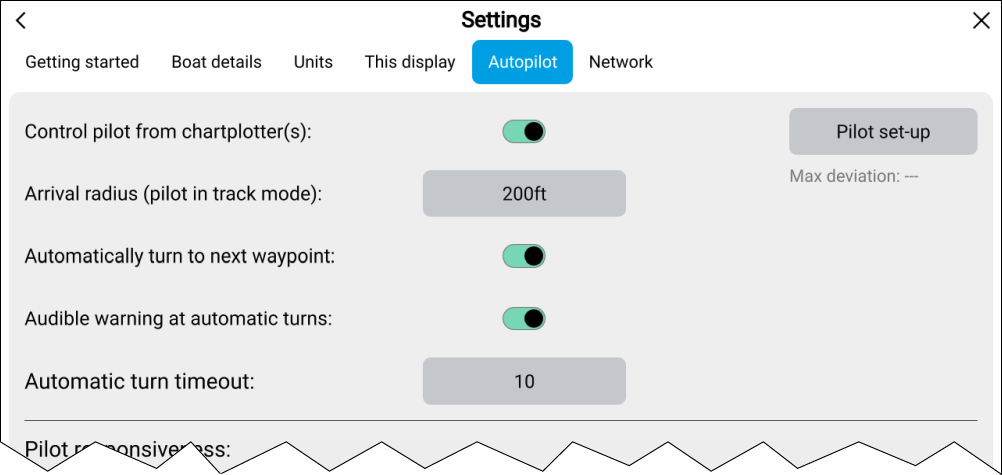
Configuration
Arrival radius (pilot in track mode) — The automatic turning to waypoint notification is displayed when your vessel reaches the specified distance from the current active waypoint.
Automatically turn to next waypoint — When this option is enabled, your vessel automatically turns to the next waypoint in a route.
Audible warning at automatic-turns — When this option is enabled, the display will sound an audible beep as the countdown reaches zero.
Automatic turn timeout — Determines the length of the countdown timer.
If the waypoint arrival alarm is enabled, the Automatic turning to waypoint notification is used.
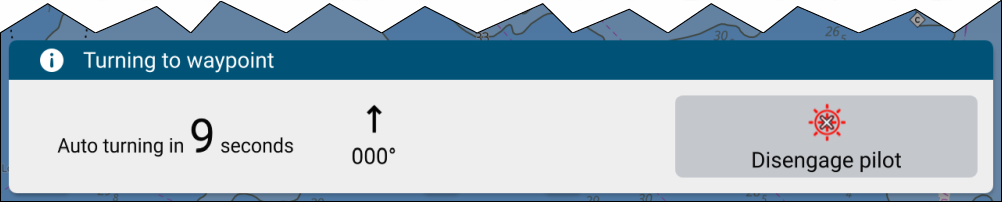
Figure 1. Automatic turning to waypoint notification example
Select Disengage pilot from the turning to waypoint notification to disengage the autopilot and prevent the vessel from automatically turning.
If the waypoint arrival alarm is disabled, the brief automatic turning notification is displayed instead of the full turning to waypoint notification.
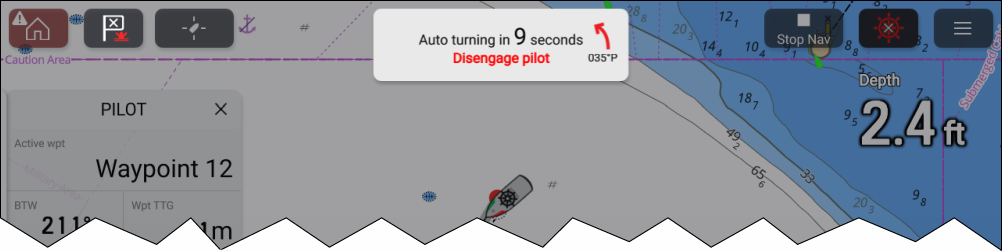
Figure 2. Automatic turning brief notification example
To prevent the vessel from automatically turning, select Disengage pilot.