AIS target context menu
When an AIS target is selected in the Radar app the AIS target context menu is displayed.
AIS targetContext menuThe AIS target context menu includes the following information and settings:
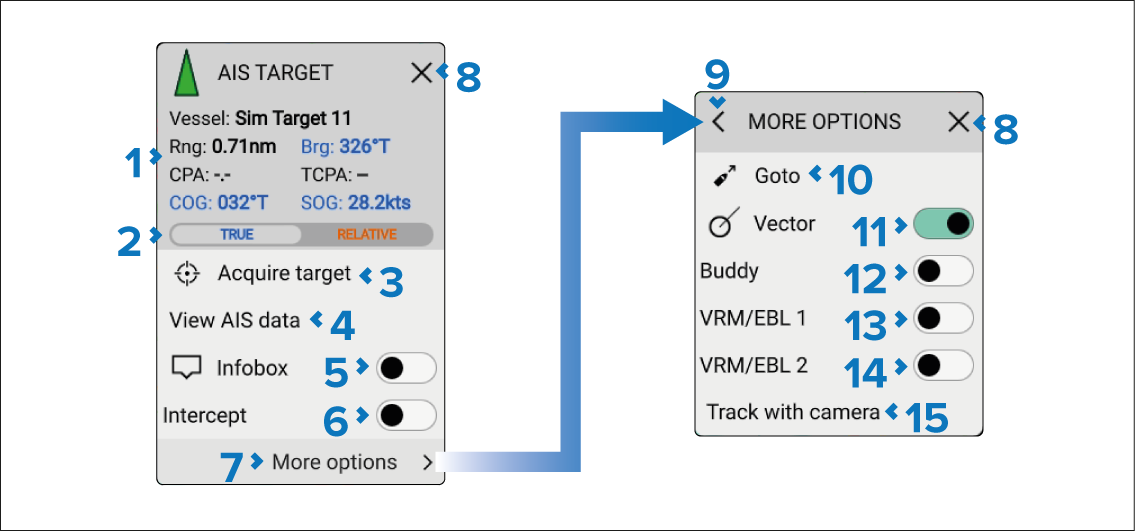
AIS data — The following AIS data is displayed:
Vessel name.
Range from your vessel.
Bearing from your vessel.
CPA (Closest Point of Approach) and TCPA (Time to Closest Point of Approach).
Course (COG or relative course).
Speed (SOG or relative speed).
True/Relative — Switches Bearing, Course and Speed data between True and Relative for the selected target.
Acquire target — Acquire the AIS target as a Radar target.
View AIS data — View full page AIS data report.
Infobox — Enable and disable onscreen display of AIS data next to the target symbol.
Intercept — Enable and disable target interception.
More options — View further options.
X (close)
— Close the context menu.< (back arrow) — Go back to first context menu.
Goto — Perform a goto.
Vector — Enable and disable target vectors.
Buddy — Add or remove target from Buddy list.
VRM/EBL 1 — Enable and disable VRM/EBL 1.
VRM/EBL 2 — Enable and disable VRM/EBL 2.
Track with camera — Track the target with a compatible PTZ camera.
First responder
When the display is configured using the First responder activity the following additional data and options will be available:
AIS data — Boat type, Status, Intcpt (Intercept time).
Designate TOI.
Send message.