Panel mounting
To panel mount the Radio follow the steps below.
Panel mountingMounting
Before mounting the product, ensure that you have:
Selected a suitable location, ensuring there is nothing behind the mounting surface that may be damaged when drilling / cutting.
Identified the cable connections and route that the cables will take.
Drilled out the mounting holes on the unit.
Removed the front bezel.
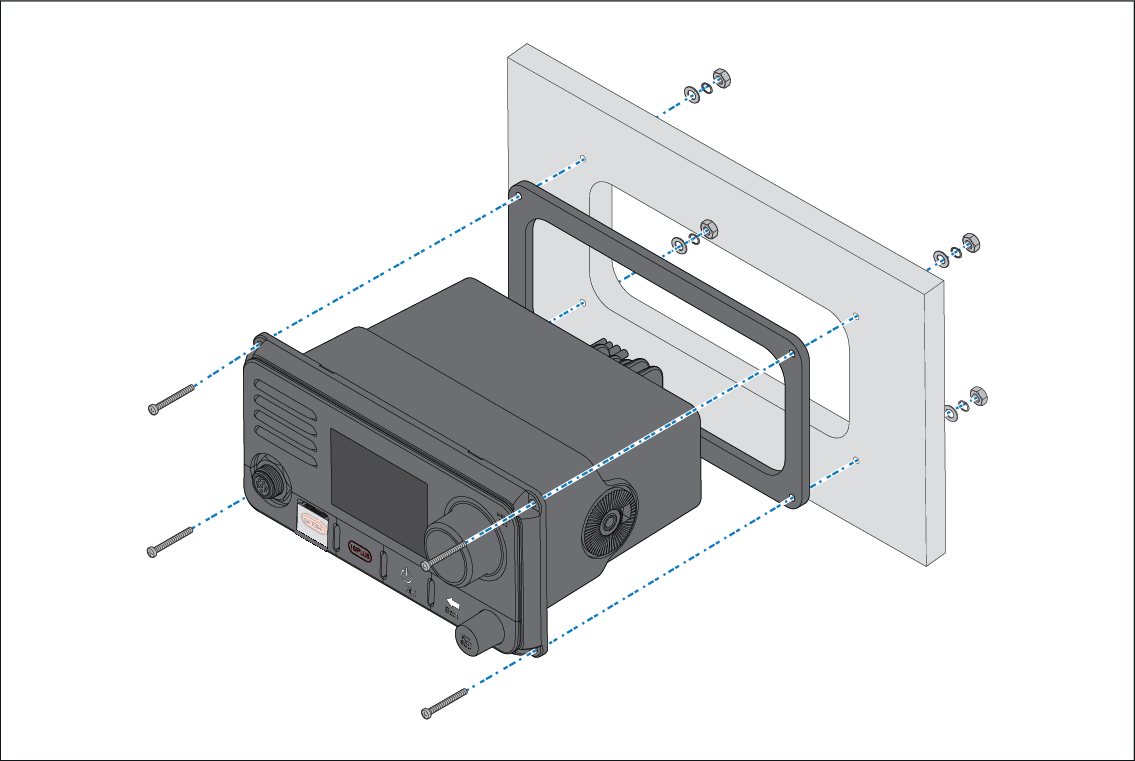
- Check the selected location for the unit. A clear, flat area with suitable clearance behind the panel is required.
- Fix the supplied mounting template to the selected location, using masking or self-adhesive tape.
- Using a suitable hole saw (the size is indicated on the template), make a hole in each corner of the cut-out area.
- Using a suitable saw, cut along the inside edge of the cut-out line.
- Ensure that the unit fits into the removed area and then file around the rough edge until smooth.
- Drill 4 holes as indicated on the template to accept the fixings.
- Remove the backings from the supplied gasket.
- Place the gasket in position on the back of the unit and press firmly onto the flange.
- Connect the power, and other cables to the unit.
- Slide the unit into place and secure using the fixings provided.
- Attach the front bezel.
Note
The supplied gasket provides a seal between the unit and a suitably flat and stiff mounting surface or binnacle. The gasket should always be used. It may also be necessary to use a marine-grade sealant if the mounting surface or binnacle is not entirely flat and stiff or has a rough surface finish.