A unique ATIS ID must be entered before ATIS
mode can be enabled.
The ATIS ID can only be entered when the EUR (Europe)
channel set is selected.
ATIS ID
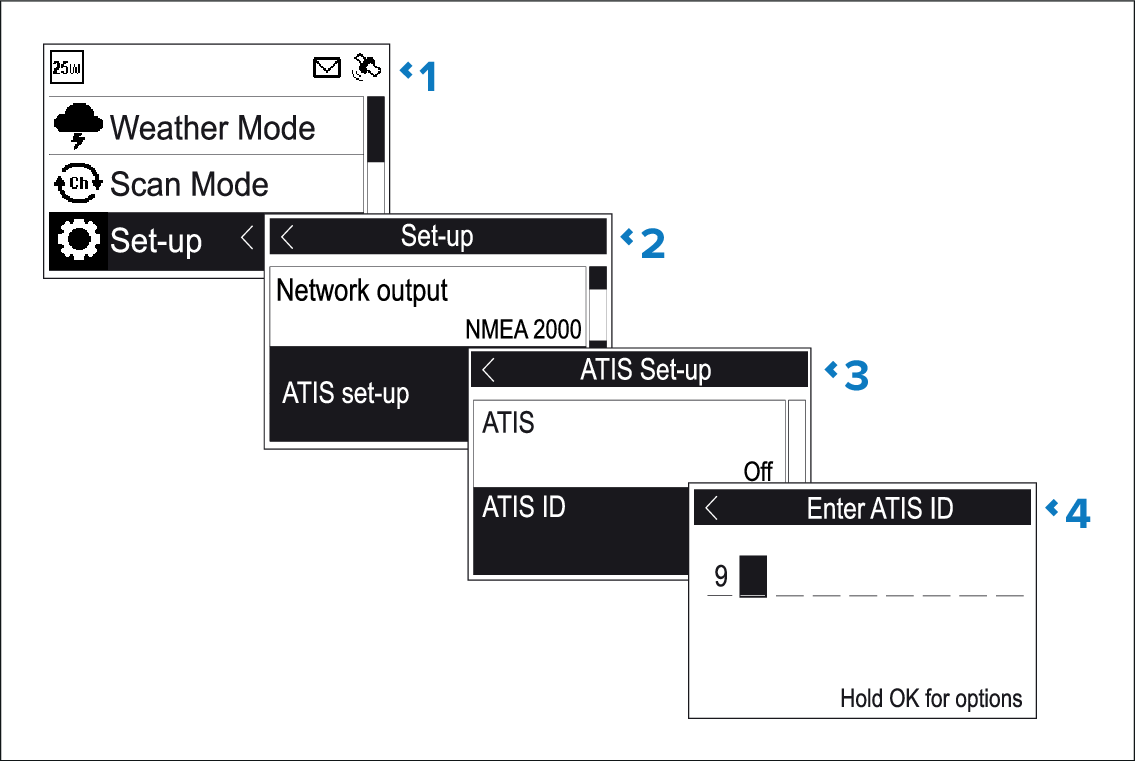
From the Main menu.
Select Set-up.
Select ATIS set-up.
Select ATIS ID.
Not set will be displayed if no ATIS ID has been set.
The first digit is set to a ‘9’ and cannot be changed, this is
because all ATIS IDs start with a ‘9’.
As most ATIS IDs consist
of a ‘9’ followed by your 9 digit MMSI number; if your radio already
has an MMSI number the ATIS ID will be pre-filled in this format.
If the ATIS ID has been pre-filled, check it carefully
against your issued ATIS ID.
To enter your ATIS ID manually, use the Rotary
knob or the Channel Up and Channel
Down buttons on a Raymic handset to cycle through the available
numbers and press OK to confirm each number and
move to the next digit.
You should only enter the unique 10 digit ATIS ID provided
by your licensing authority.
Press the Back button at any time to
edit digits you have already entered.
Press and hold the OK button to display
options to Move cursor back and forward through
the digits.
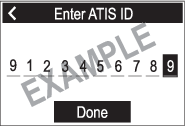
When the final digit is confirmed select DONE.
Figure 1. Example
The ATIS ID is displayed onscreen, check that it is correct,
then:
Select Yes – Save, or
if the number entered is not correct select No – Retry.