Entering your MMSI number

To program your radio with your MMSI number follow the steps below.

MMSI number

Note
  • In some regions (such as the USA), the MMSI and Static Data must be entered only by an authorized Raymarine dealer or other appropriately-qualified marine communications equipment installer.

  • The MMSI number can only be entered when the radio is configured to use the EUR (Europe) channel set.
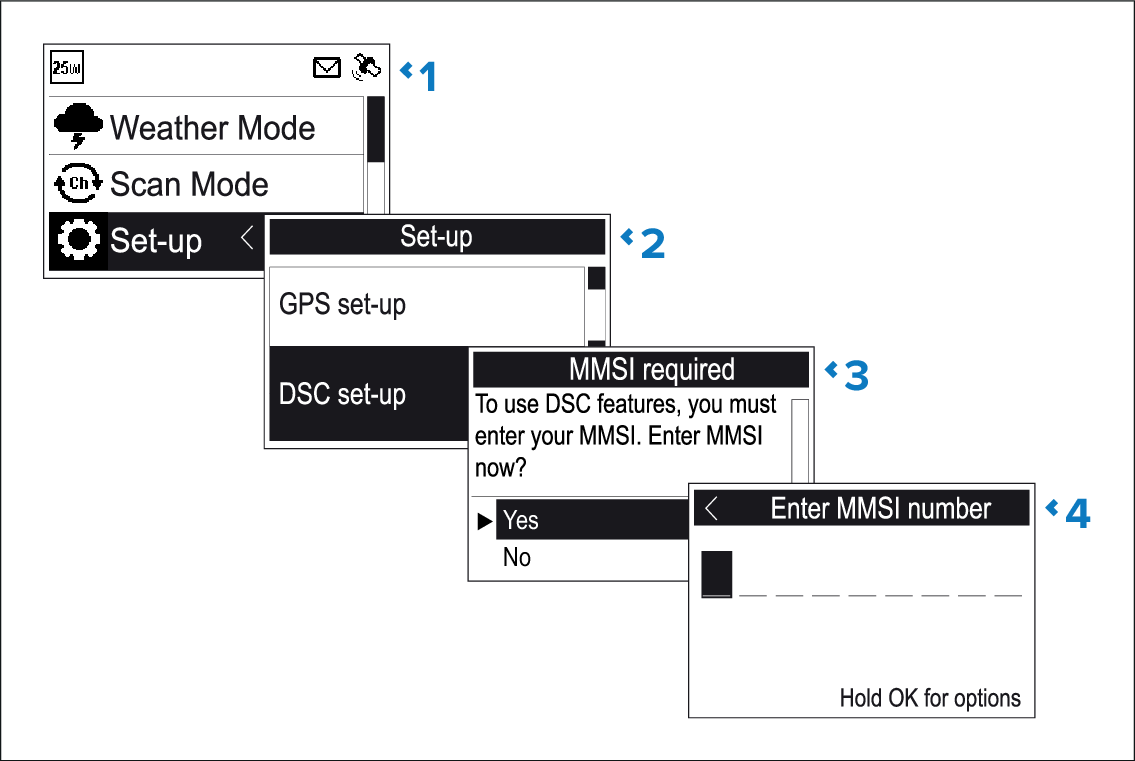
From the Set-up menu: (Menu > Set-up)

  1. Select DSC set-up.
  2. Select MMSI.
    The MMSI required message will be displayed if no MMSI number has been set.
  3. Select Yes.
  4. Use the Rotary knob or the Channel Up and Channel Down buttons on a Raymic handset to cycle through the available numbers and press OK to confirm each number and move to the next digit.
    Important

    You should only enter the unique 9 digit MMSI number provided by your licensing authority.

    MMSI numbers starting with a ‘0’ are only used for groups and coast stations. If you enter a ‘0’ as the first digit the radio will assume you are entering a coast station MMSI and automatically assign a ‘0’ as the second digit; this is to ensure a group MMSI is not entered as the radio’s unique MMSI.

  5. Press the Back button at any time to edit digits you have already entered.
  6. Press and hold the OK button to display options to Move cursor back and forward through the digits.
  7. When the final digit is confirmed select DONE.
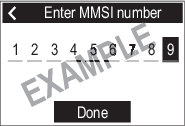
    Figure 1. Example

  8. The MMSI is displayed onscreen, check that it is correct, then:
    1. Select Yes – Save, or
    2. if the number entered is not correct select No – Retry.