Routing cables through the riser's sidewall
Ideally, the camera’s cables should be routed through a mounting surface cutout which is weather-tight and protected from water ingress, fouling and sun damage. However, if this is not possible, the cables can alternatively be routed through the riser’s sidewall. An optional 20 mm (0.79 in) wide, removable hatched area is provided on the riser for this purpose.
Use the following instructions to remove the riser’s sidewall hatched area.
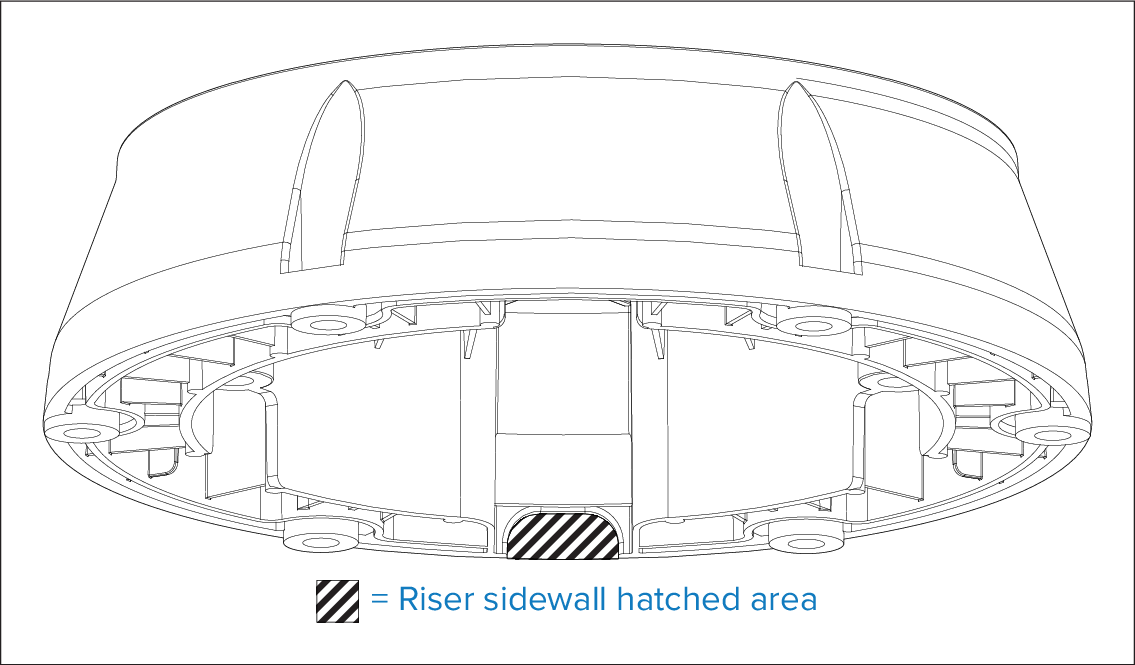
- On the underside of the riser, mark the 20 mm (0.79 in) sidewall hatched area location identified on the supplied mounting template.
- Use a half round file or a rotary tool to remove the sidewall hatched area (as identified in the illustration above), so that the wall is level with the inside lip.
- Use a half round file and / or sandpaper to smooth any rough edges or burs on the removed area.