ORU — mounting
MountingORUORUMounting
Before mounting the product, ensure that you have:
Selected a suitable location, based on the location requirements found in this document.
Identified the relevant cable connections and the route that the cables will take.
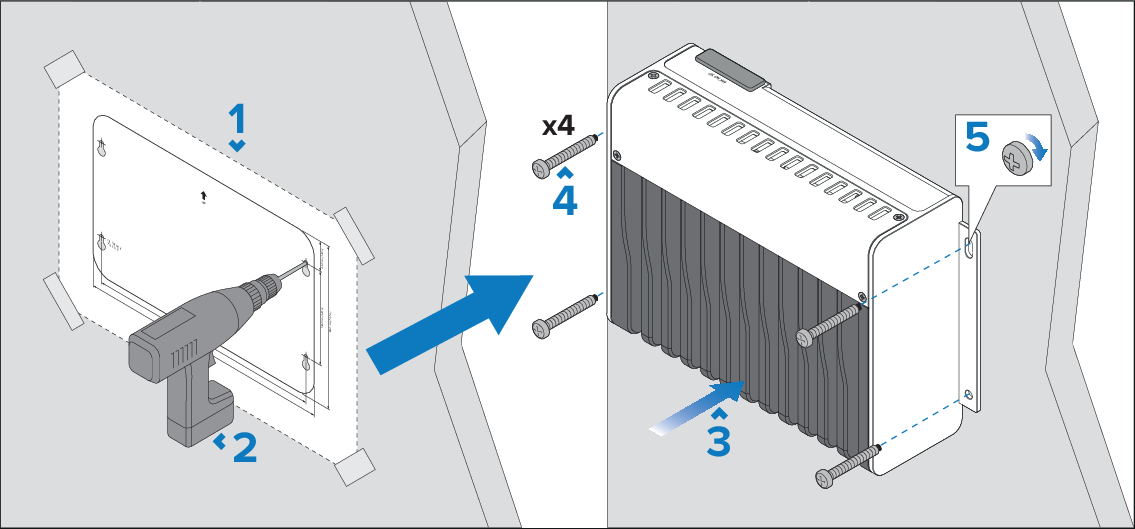
- Secure the mounting template in the required location using adhesive tape.
- Drill 4 holes at the marked location on the template, and then remove the mounting template.
- Position the unit over the 4 drill holes.
- Push the 4 fixing screws through the Object Recognition Unit’s mounting lugs and into the drill holes.
- Fully tighten the 4 fixing screws.
Note
Drill bit, tap size and tightening torque are dependent on the thickness and type of material the unit is to be mounted on.