Configuring the RSW-Series wind transducer using i70 / i70s instrument display
Configuring the RSW-Series wind transducer using i70 / i70s instrument
display
The RSW-Series wind transducers
can be configured using an i70 / i70s instrument
display, running software version v3.23 or later.
RSW Wired ConfigurationWind transducer ConfigurationThe RSW-Series wind
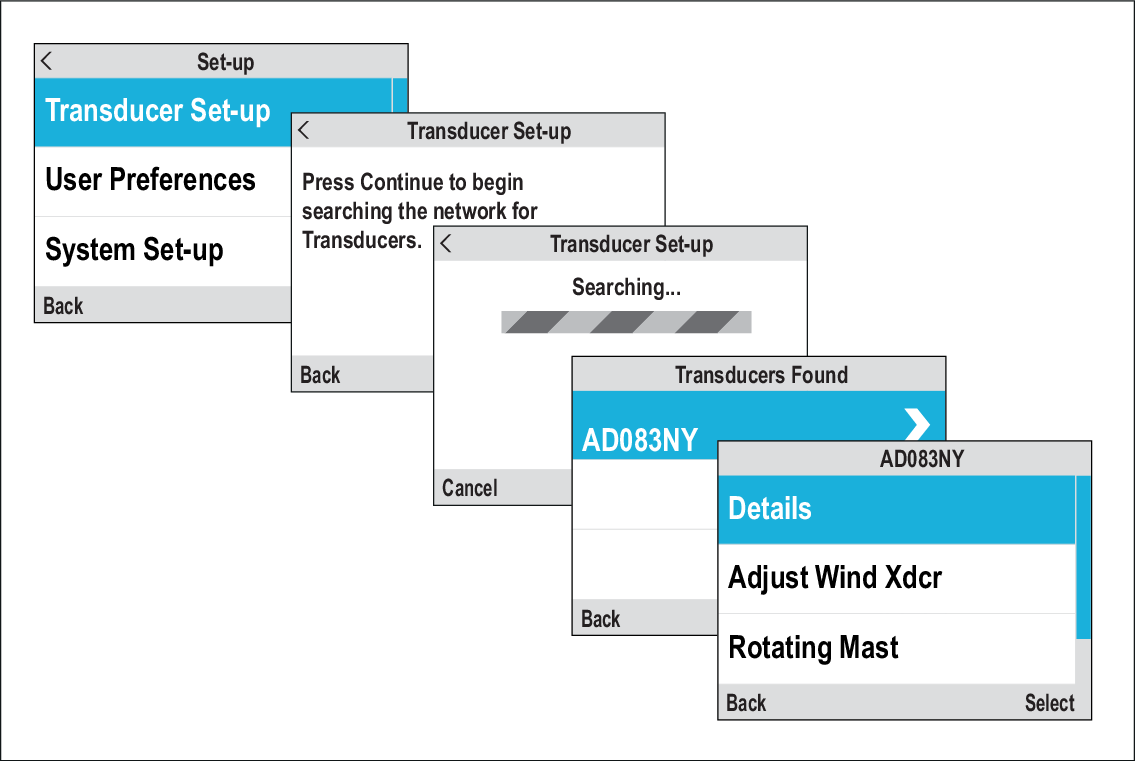
transducer configuration is initiated from the Transducer
Set-up menu: Menu > Set-up > Transducer Set-up
Select Continue to search for connected
transducers.
Select your RSW-Series wind transducer from the list.
If your vessel has a rotating mast:
Rotating mastSelect Rotating Mast and select On.
If applicable, select Adjust Wind Xdcr and use the Up and Down buttons
to enter the offset value for your transducer.
A heading sensor is required for rotating masts.
The offset should be measured from the mast’s centerline to
the transducer. This may be different from the vessel centerline.
If your vessel does not have a rotating mast and does not
have a heading sensor; if applicable, select Adjust Wind
Xdcr and use the Up and Down buttons to enter the offset value for your transducer.
The offset should be measured from the vessel’s / mast’s centerline
to the transducer.
If your vessel does not have a rotating mast but does have
a heading sensor, no offset value is required. However, if poor heading
data is affecting wind data readings, you can enable Ignore
Heading and if applicable, use the Up and Down buttons to enter the offset value for
your transducer from the Adjust Wind Xdcr menu.