Preparing the mounting surface — flush mounting
Flush mounting requires the same cutout hole as surface mounting and an additional rebate around the edge of the cutout area. When the performance display is flush mounted, the glass will be flush with the mounting surface.
The following procedure is for preparing the mounting surface for flush mount installations. For surface or retrofit / offset mounting details, refer to:
Before preparing the mounting surface ensure that:
Your selected location meets the location requirements. For details refer to: Location requirements
You have identified cable connections and the route that the cables will take.
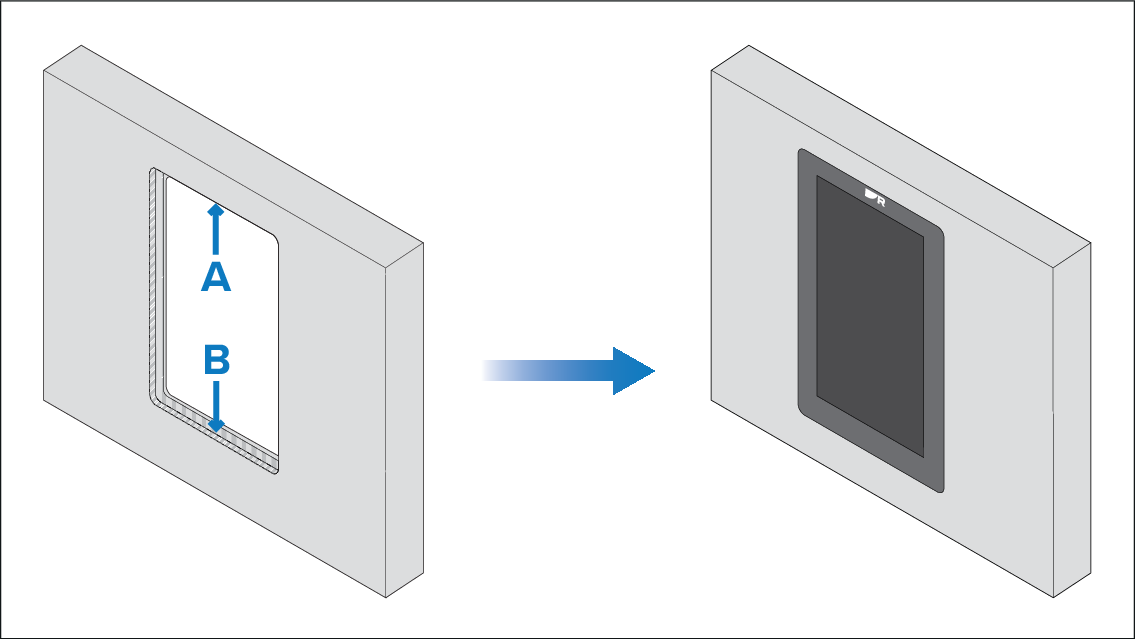
A — Cutout (when flush mounting the cutout will be the same size as for surface mounting).
B — Flush mounting requires an extra rebate to recess the display fully in the mounting surface.
When flush mounting, the fixings go through holes drilled in the rebated, and therefore thinnest, part of the mounting surface. Before preparing the mounting surface, ensure that sufficient surface thickness will remain (once rebated) to take the weight of the display. The final rebated area must be at least as thick as the display’s bezel (7.00 mm (0.28 in)), in order to ensure that the display sits entirely flush with the mounting surface. Due to these requirements, not all mounting surface types and materials are suitable for flush mounting the display. It is the installer’s responsibility to ensure that the mounting surface is suitable for flush mounting. If the mounting surface is not suitable, the display must be surface or trunnion mounted instead.
- Mark the cutout line identified on the supplied mounting template on the mounting surface.
- Mark the rebate for flush mount line identified on the supplied mounting template on the mounting surface.
- Use a drill and an appropriate size drill bit or hole cutter to cut out the corners of the cutout line. The corner diameter for the instruments is 8.00 mm (0.31 in).
- Use a jigsaw or similar cutting tool to cut out the remainder of the cutout area.
- Use a router hand tool to recess the marked rebate area to a depth of 7.00 mm (0.28 in).
- Carefully (and temporarily) fit the display to the cutout area, to check for a good fit. Do not use any fixings at this time. If the fit is very tight, it may be necessary to remove the display and file the edges of the cutout to achieve a better fit, using a half round file and/or sandpaper. Alternatively, if the fit is loose and there is a visible gap between the display’s outer bezel and the cutout, this will need to be filled with marine-grade sealant or suitable packing material to fill the gap. This should only be done once the display has been secured to the surface using the fixings, as described in the next mounting procedure.
- Use a half round file and/or sandpaper to smooth any rough edges or burs on the cutout hole.