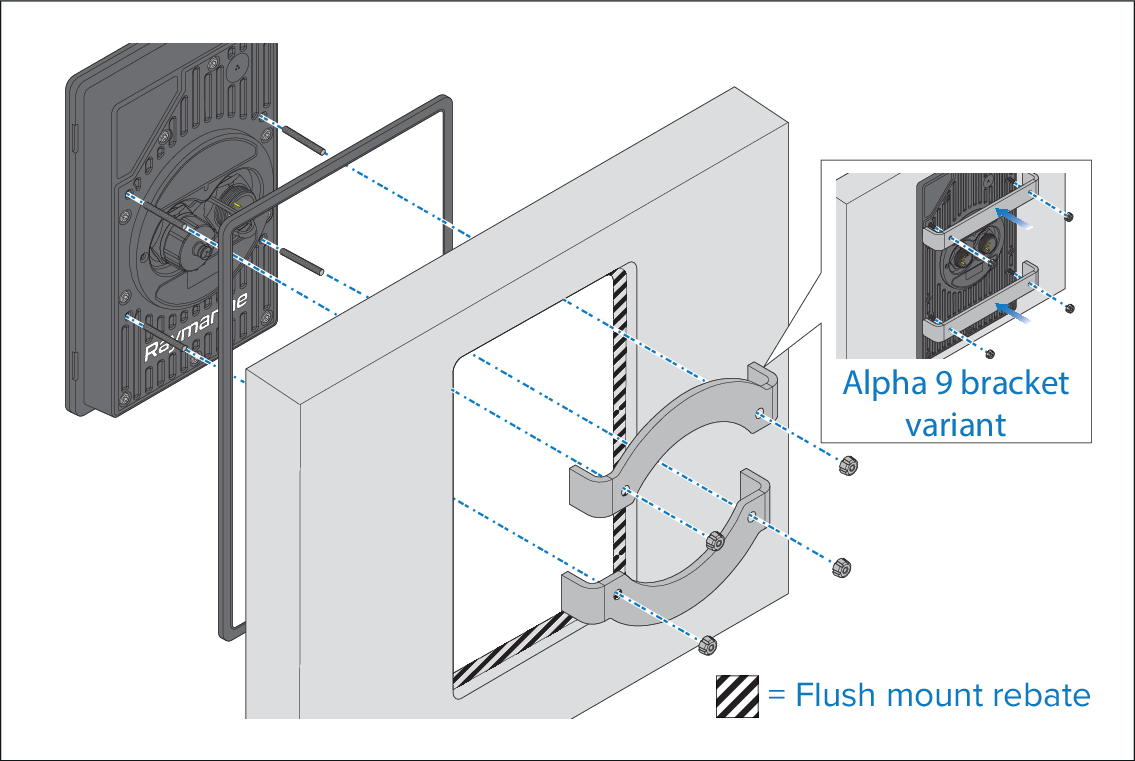
Follow the steps below to surface or flush mount the performance
display.
Important In above-decks installations, marine-grade
sealant should be used to seal the gap between the mounting surface
and the performance display bezel.
InstallationFlush mountInstallationSurface mountFlush mountSurface
mount
- Ensure you have followed the relevant instructions for
preparing the mounting surface for performance display mounting.
- Route the relevant cables behind the mounting surface cut-out.
This may be difficult or not possible once the display has
been mounted.
- (Flush mount only) remove the waterproof gasket cutout
as shown above, and fit the gasket onto the performance display.
- Depending on your mounting method, place the performance
display into the cutout / flush mount rebate.
- Insert the supplied threaded studs into the performance
display.
- Place the supplied mounting brackets over the threaded
studs.
- Attach the supplied thumb nuts to the end of each stud.
- Tighten the thumb nuts by hand until the brackets and display
are secured firmly in position.