PoE network connections
Connecting the RNS-8 network switch to Raymarine equipment via a PoE RayNet connector.
Required cabling / connectors:
RayNet (female) to RayNet (female) cable (not supplied).
OR:
RayNet (female) to RJ45 (male) network cable (not supplied).
RJ45 to RJ45 waterproof coupler. (not supplied).
For further information on the cabling required, refer to the following section: Spares and accessories
Example: PoE network connection scenario
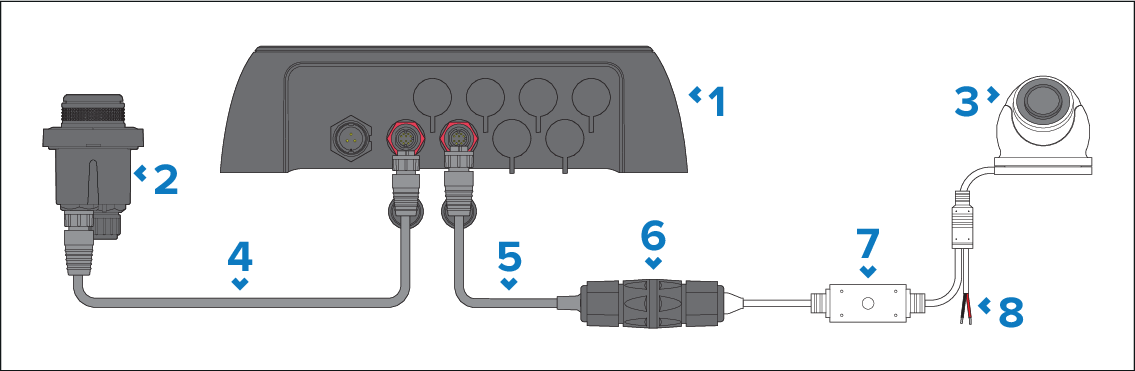
| Network connections | Description |
|---|---|
1 |
RNS-8 network switch. |
2 |
Remote keypad (supplied power via PoE). |
3 |
IP camera (supplied power via PoE). |
4 |
RayNet (female) to RayNet (female) network cable (not supplied). |
5 |
RayNet (female) to RJ45 (male) network cable (not supplied). |
6 |
RJ45 to RJ45 waterproof coupler. (not supplied). |
7 |
IP camera RJ45 (male) cable. |
8 |
IP camera power cable (if powering the camera via PoE, do NOT connect this to a 12 V / 24 V dc feed). |