Multiple switches
Systems with more than 8 devices will require more than one network switch. Network switches can be connected together (daisy-chained) for this purpose.
ConnectionsMultiple switchesDaisy-chaining
The network switch can be connected (daisy-chained) to another network switch via any of the connection ports.
Example: daisy-chain connection scenario
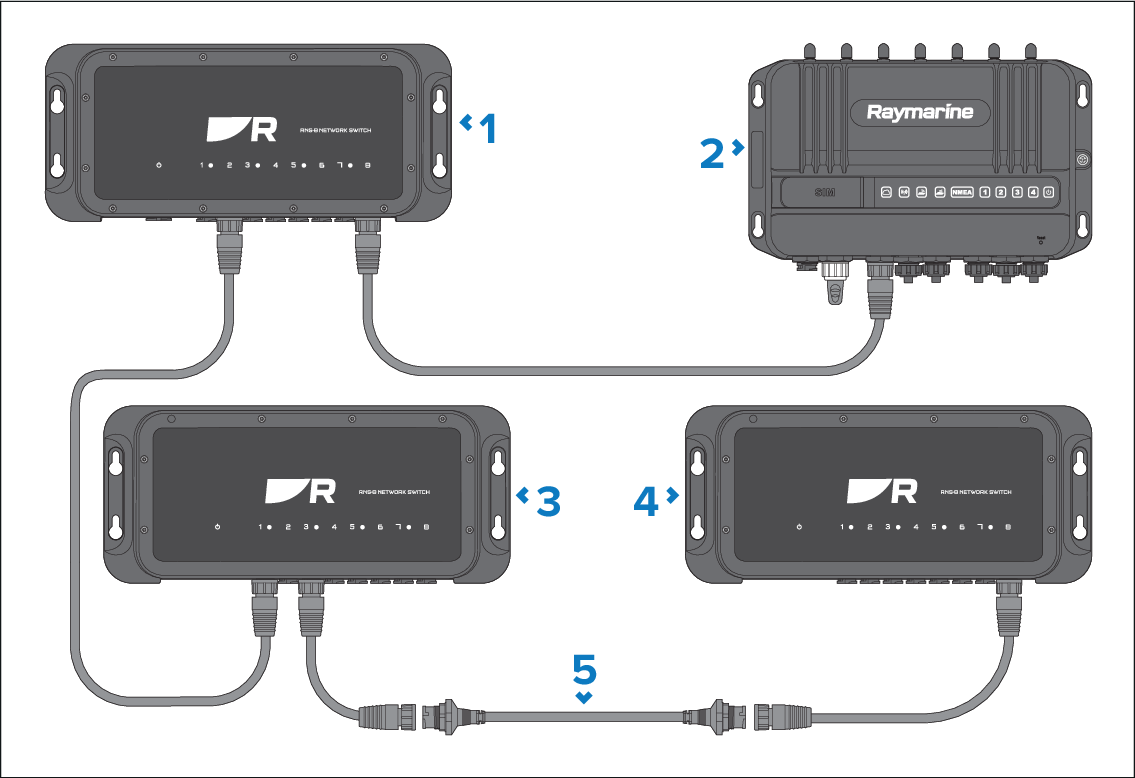
If daisy-chaining 4 or more network switches together within a system, it is recommended that one network switch is used as a central connection point. This will ensure that any effects resulting from connection issues (such as faulty cabling or slow connection speeds) are minimized within your system.
It is recommended that a maximum of 8 network switches are daisy-chained together at one time.
Description |
|
|---|---|
1 |
RNS-8 network switch. |
2 |
Mobile router (YachtSense Link shown). |
3 |
RayNet (male) to RayNet (male) adapter cable (A80162) (100 mm (3.94 in)). Suitable for joining (female) RayNet cables together for longer cable runs. |
For further information on additional cabling options, refer to: Spares and accessories