Analog Depth, Speed and Temperature (DST) transducer connections
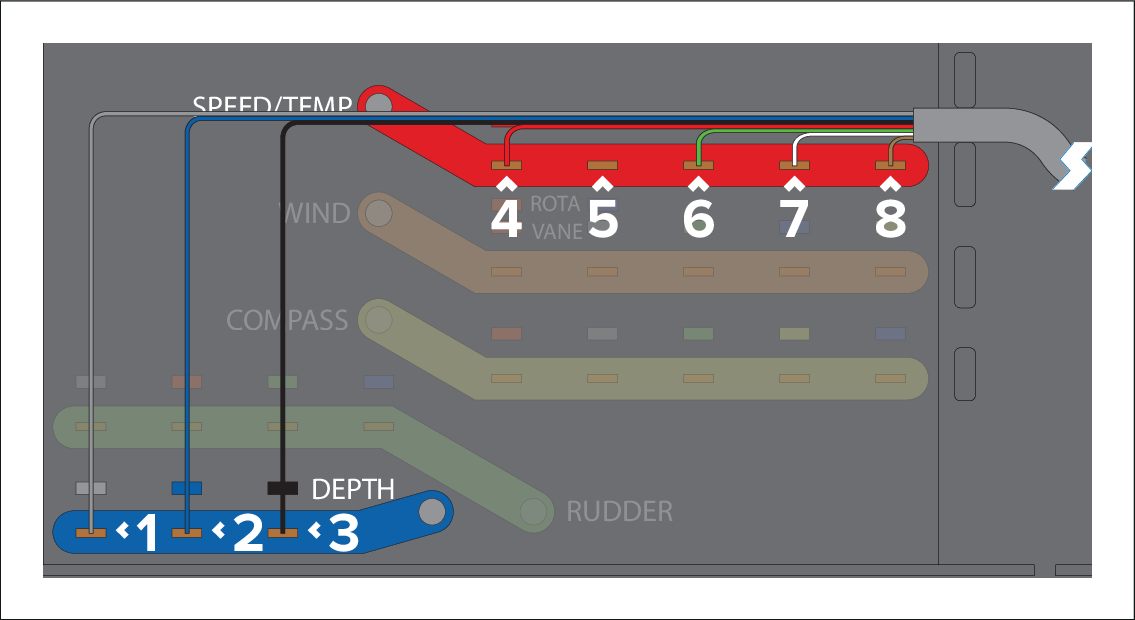
Analog Depth, Speed and Temperature (DST) transducers can be connected to the iTC-5 via the following connection method. Additional care must be taken to ensure that the screen connection is correctly wired.
Transducer connectionsDSTConnectionsDST
When connecting a Depth, Speed and Temperature (DST) transducer to an iTC-5, only one screen connection is required. This must be made to the Depth terminal on the iTC-5. In this configuration, the screen on the Speed / Temp terminal must remain disconnected:
Do NOT bridge or connect together the screen connections on the iTC-5 Depth and Speed / Temp terminals.
If the cable is too thick to fit into the iTC-5 cable guides / channels, strip-back the cable sleeve to expose more wire. Then make the connection and apply heat shrink to any portion of the wire that is exposed outside of the iTC-5 casing.
Cable color |
Signal name |
|
|---|---|---|
1 |
Screen |
0V (shield) |
2 |
Blue |
Piezoceramic + |
3 |
Black |
Piezoceramic – |
4 |
Red |
Speed V+ |
5 |
Do NOT connect the screen on the Speed / Temp terminal. |
Do NOT connect the screen on the Speed / Temp terminal. |
6 |
Green |
Speed (signal) |
7 |
White |
Temperature (signal) |
8 |
Brown |
Temperature 0V |