Pages menu
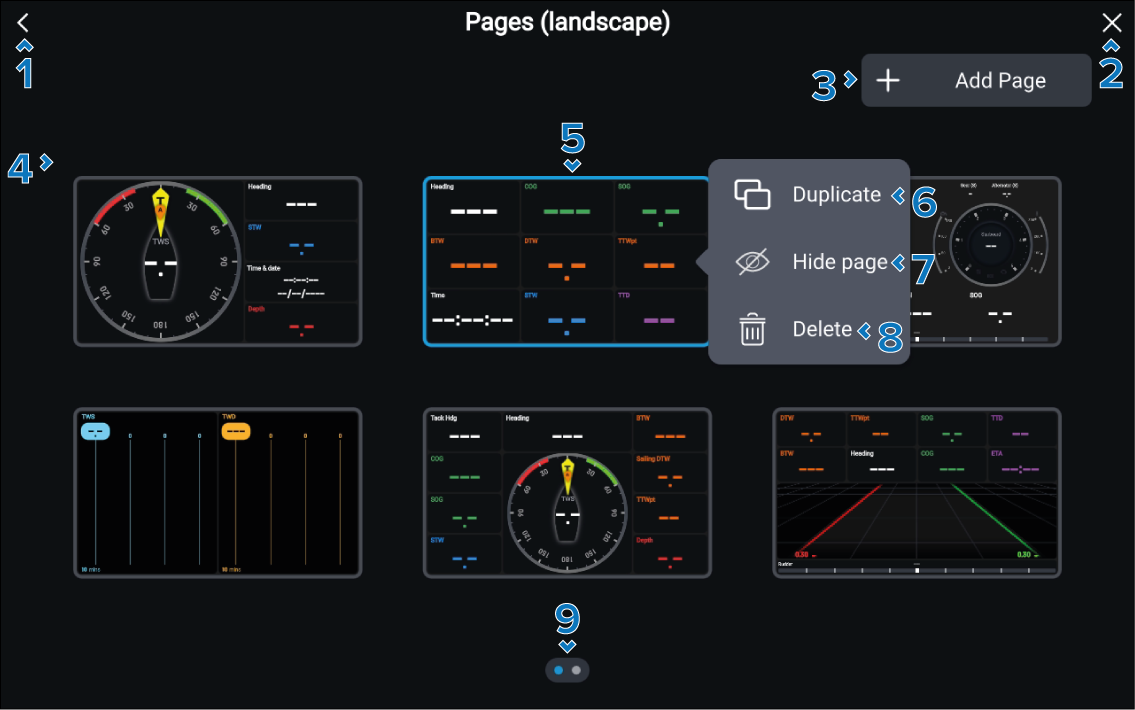
The Pages menu enables you to view your data pages at a glance and provides page management options.
Data appPage menuPage management
Description |
|
|---|---|
1 |
< (Back) Select to go back to the last data page. |
2 |
X (Close) Select to go back to the last data page. |
3 |
Add Page Select to add a new data page. |
4 |
Data pages At a glance view of all data pages. |
5 |
Data page The following actions are available:
|
6 |
Duplicate Duplicate the selected data page. |
7 |
Hide page Hide the selected page in the current data app page instance. |
8 |
Delete Delete the selected data page from the current data app page instance. |
9 |
Page indicator Indicates that the Pages menu has more than 1 page. You can swipe or scroll to view the available pages. |