Frame options
Frames on pages within the Data app can be modified.
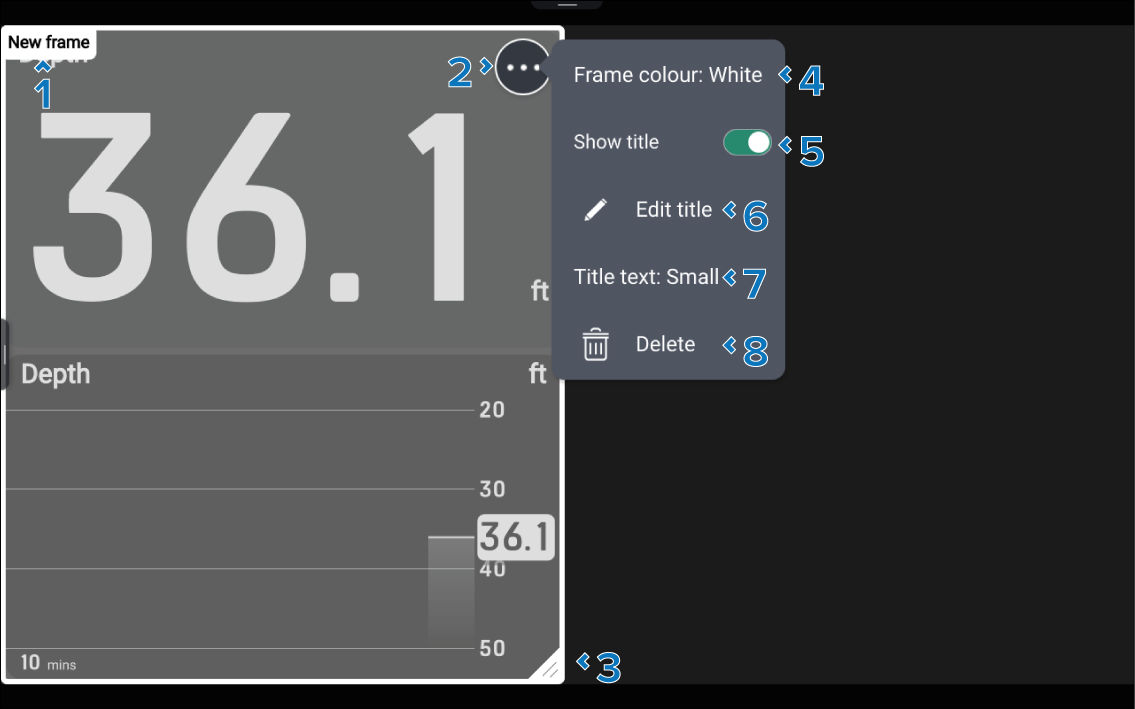
Data appEditing framesSelect and hold on a frame’s border to enter edit mode. In edit mode the frame will be highlighted and the ••• icon will appear. In edit mode the frame can be resized by dragging the triangle located in the bottom right corner. Selecting the ••• icon will open the frame pop-over menu.
Description |
|
|---|---|
1 |
Frame title |
2 |
••• icon Open the pop-over menu. |
3 |
Resize Drag the corner to resize the frame. |
4 |
Frame color Change the color of the frame’s border. |
5 |
Show title Toggle the frame title on and off. |
6 |
Edit title Edit the frame’s title. |
7 |
Title text Change the size of the frame’s title text. |
8 |
Delete Delete the frame. |
Frames are positioned behind data items and operate independently; moving a frame does not move the data items within it.