Data app overview
The Data app is a free-form widget-based data page viewer which enables you to view data generated by your chartplotter, and supported data generated by connected sensors and devices.
The Data app provides an enhanced and more customizable user interface, compared to the existing legacy Dashboard app.
Data appA number of data pages are available by default. These default pages are determined by the Boating Activity selected during the chartplotter’s initial start up wizard. You can create new data pages, or modify existing pages. The data app can hold up to 18 data pages.
The Data app can be configured as fullscreen, or splitscreen, half-portrait app pages.
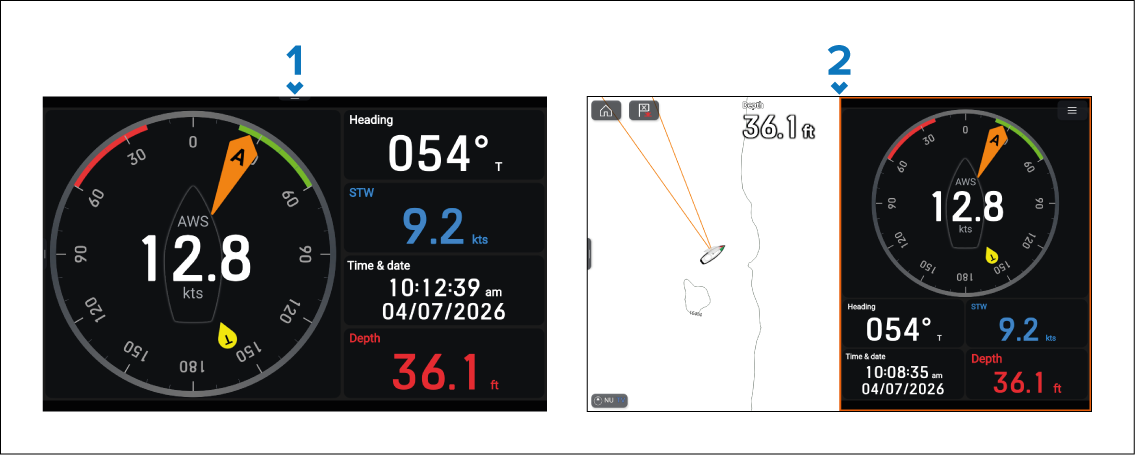
Example fullscreen data app page.
Example splitscreen data app page.
When viewing the data app in a fullscreen app page, the onscreen Home, WPT/MOB, Pilot and Menu icons are automatically hidden. To reveal the onscreen icons, either swipe your finger downwards from the top of the screen, or use the equivalent physical buttons instead.
You can customize which pages are displayed in each data app page instance. Networked chartplotters will share the data master chartplotter’s app pages.
On systems with a large number of data pages, when opening the Data app it may take a few seconds to render all widgets across all pages. If you begin scrolling immediately after opening the app, some widgets may take a short time to appear.
Once all widgets have initialized, they remain active until the Data app is closed.