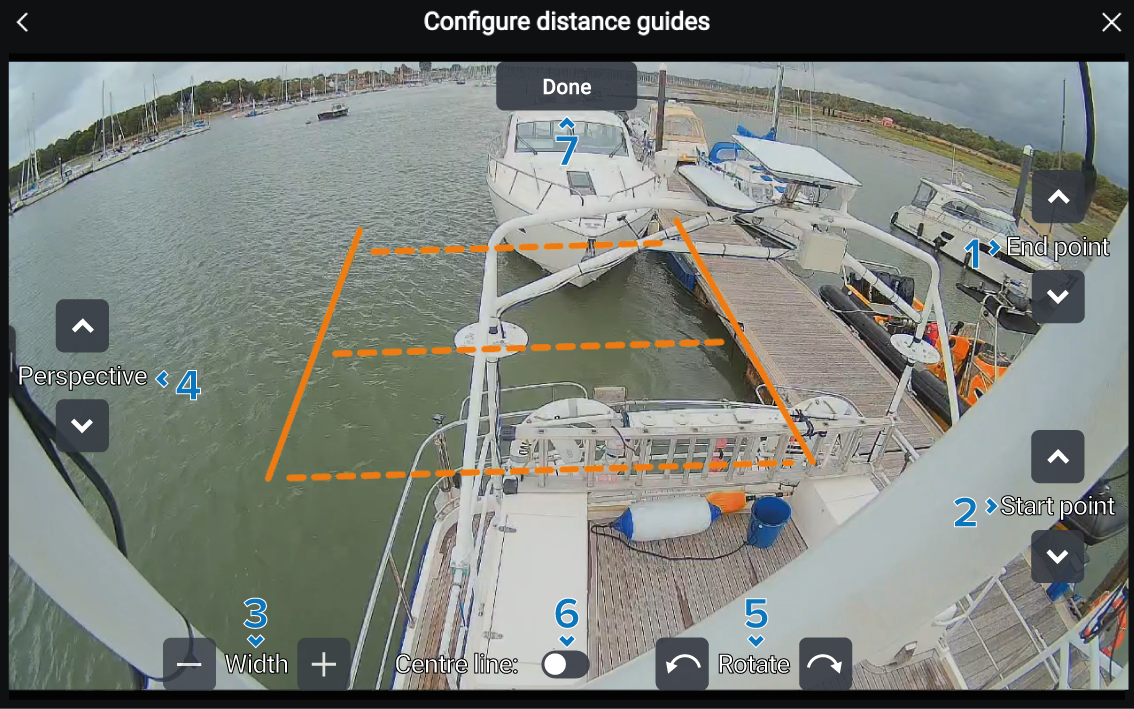
The Distance guides features requires
installation specific configuration.
Note Each adjustment of the Distance guides is automatically saved.
Distance guides
(CAM400)ConfigurationFrom the Configure distance guides menu: :
- Use the End point controls to extend
or retract the horizontal line farthest from the camera.
Adjusting the End point line will not
affect the position of the Start point line.
- Use the Start point controls to move
the horizontal line closest to the camera.
The Distance guides are most effective
when the Start point line is in alignment with
the outer edge of the hull.
Adjusting the Start point line will not affect the position of the End point line.
- Use the Width controls to increase or
decrease the width of the Distance guides.
Adjusting the Width will not affect the
position of the Start point and End point lines.
- Use the Perspective controls to adjust
the angle of the Distance guides.
The Distance guides are most effective
when the Perspective is aligned with the camera’s
horizontal viewing angle.
- Use the Rotate controls to adjust the
rotation of the Distance guides.
The Distance guides are most effective
when the rotation is aligned correctly to the orientation of the camera
image.
- Use the Centre line toggle to enable
or disable a center line within the Distance guides.
- When you have finished configuring the Distance
guides select the Done button.