IP discovery via a device manager app
Dedicated application are available that enable you to find a device’s IP address.
The following instructions are provided as an example and are based on an the ODM Device Manager application. The ODM Device Manager application is a third party application and as such is subject to change depending upon which version of application you are using.
SetupWeb browserIP discovery via device manager
In order to access the camera’s IP address and user interface using the ODM application, follow the steps below:
- Once installation is complete, if required open the installed
application.
The application will open and display details of detected devices:
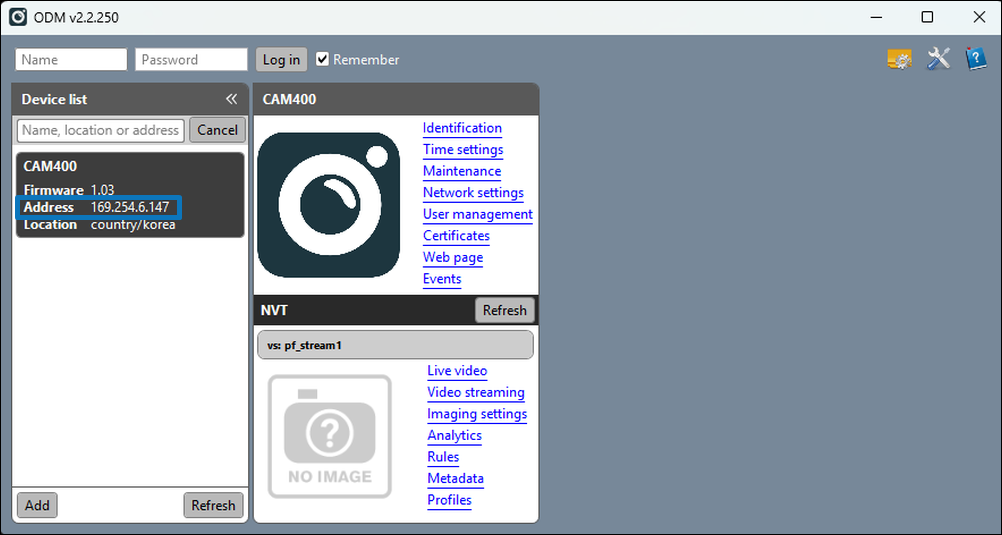
You can now access the device’s user interface by entering its IP Address in the address bar of a supported web browser in the following format: https://xxx.xx.x.xxx.
IP cameras can take up to 60 seconds to appear on a network. If the camera does not appear in the Device list, ensure that you have waited a sufficient amount of time before attempting to Refresh.
If you cannot connect to the user interface after entering the camera’s IP address into your web browser, ensure that your computer is using the same IP address range as the camera before re-trying. For more information, refer to: Camera IP address discovery